

Papago vs Google Translate for Korea and Japan (and Where Ask Lucy Fits)
Last updated
Ask anyone flying to Seoul or Tokyo which translation app to download and you will hear two answers on repeat: Naver Papago for natural Korean and Japanese phrasing, and Google Translate for offline packs and quick sign scanning. Here is an honest three-way look at where each wins — and why neither solves the hardest moments at the dinner table or pharmacy.

On this page (12 sections)
- The short version
- Which to pick
- Why Korea and Japan Break Ordinary Translation Habits
- Where Naver Papago Genuinely Shines
- Where Google Translate Still Wins
- Where Ask Lucy Takes Over: Menus, Pharmacies, and Konbini
- Real Seoul & Tokyo Moments: Side-by-Side
- The Smartest East Asia App Setup on iPhone
- Feature comparison
- Our verdict
- Common questions
- Try Ask Lucy free
The honest three-way split for Korea & Japan
Download Naver Papago for everyday Korean and Japanese text and polite honorifics, keep Google Translate's Korean and Japanese offline packs on standby for subway basements and Android devices, and use Ask Lucy on iPhone or iPad whenever you are holding a menu, medicine box, or snack label where ingredients, hidden broths, and home-currency prices actually matter.
Pick Ask Lucy when…
- You are on iPhone or iPad (iOS 26+) and want handwritten izakaya strips, Korean BBQ menus, and multi-page drugstore boxes explained in full context
- You have food allergies saved in your Profile (behind Health consent) and need hidden dashi, saeujeot shrimp paste, wheat soy sauce, or pine nuts flagged with four-state Safety verdicts — plus Diet or Pregnancy preferences that shape Lucy's replies automatically
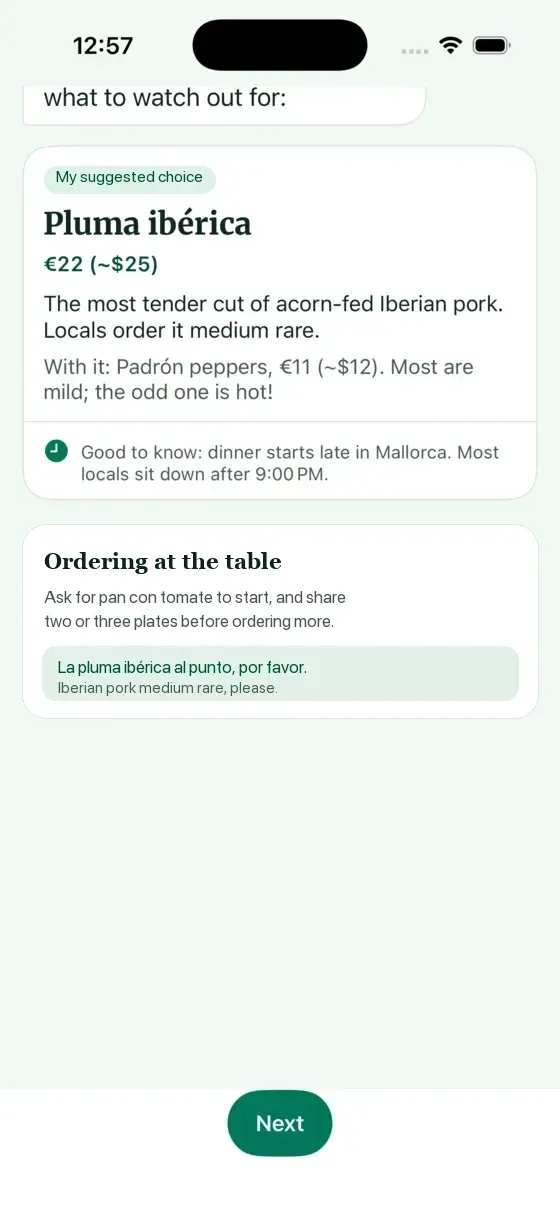
- You want Home-first prices ($11 (¥1,650) or $14 (₩19,500)), full-screen Show-your-server cards, and one-tap Join Wi-Fi Details cards from hotel sheets
Pick Naver Papago or Google Translate when…
- You use an Android phone (Ask Lucy is iPhone and iPad only)
- You need 100% offline on-device translation in a zero-signal metro tunnel or mountain ryokan (download Google Translate or Apple Translate offline packs; Papago offers downloadable offline text and voice packs for Korean, English, Japanese, and Simplified Chinese, with no offline camera/image translation)
- You want natural Korean-to-English typed chat or polite honorific phrasing (Papago shines here) or live spoken two-way conversation mode (Google Translate Conversation, Papago Voice, or Let's Tango for spoken Japanese)
Why Korea and Japan Break Ordinary Translation Habits
Korean and Japanese flip English sentence order, omit implied subjects, layer politeness levels, and hide crucial details on vertical handwritten menu strips or cramped back-of-pack ingredient boxes. Naver Papago, Google Translate, and Ask Lucy each solve a distinct part of a Seoul-and-Tokyo trip.
Where Naver Papago Genuinely Shines
Built by South Korea’s dominant internet company, Naver Papago earned its following honestly:
- Natural Korean and Japanese phrasing. For texting an Airbnb host in Busan or decoding a KakaoTalk reply, Papago sounds noticeably more natural than literal machine output.
- Honorifics toggle. One tap switches Korean output into polite jondaetmal — helpful with hosts, salon staff, and shopkeepers.
- Clean photo brush-selection. Brush your finger over one specific Korean or Japanese line instead of drowning a whole sign in floating English.
- Free on iOS and Android. Essential if you travel with an Android phone.
Where Papago runs short is culinary context. Point it at 삼겹살 (samgyeopsal) and it says “pork belly” — not whether there is a two-portion minimum, how to avoid wheat in ssamjang, or that complimentary kimchi contains salted shrimp (saeujeot).
Where Google Translate Still Wins
Even in Seoul and Tokyo, Google Translate stays worth keeping for three reasons:
- Full offline packs. Download Korean and Japanese before flying and Google Translate works in airplane mode inside subway transfers or rural onsen.
- Fast AR sign scanning. Pointing at station boards or coin lockers gives a two-second visual gist.
- Multi-country coverage and voice. Handy across broader Asia trips and live spoken Conversation mode on both Android and iOS.
Where Ask Lucy Takes Over: Menus, Pharmacies, and Konbini
General translators treat a handwritten menu, a cold-medicine box, and a subway exit as identical text. Ask Lucy (iPhone and iPad, iOS 26+) treats them as travel decisions:
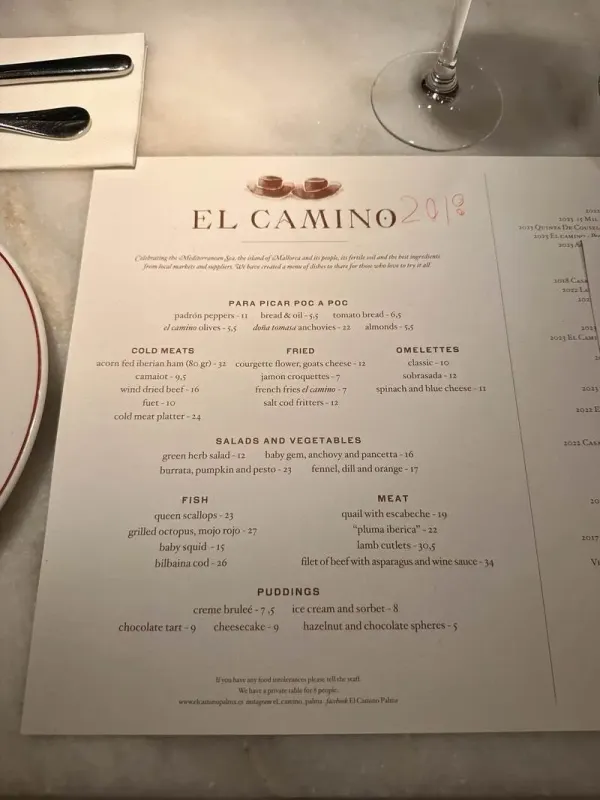
- Multi-photo context (up to 4 photos in one turn). Snap the front, ingredients, and dosing table of a Japanese drugstore box (like PABRON Gold A, where dihydrocodeine and ephedrine warnings matter) or four pages of an izakaya menu together, backed by automatic Blurry / Too dark flags and a low-light Light button.
- Hidden ingredients & four-state Safety verdicts. Save allergies (
mild,moderate, orsevere) behind explicit Health consent so Lucy spots bonito dashi in Japanese broths, saeujeot shrimp paste in kimchi, pine nuts in samgyetang, and wheat in shoyu or gochujang with dedicated four-state Safety verdicts (Safe, Caution, Unsafe, or Unknown — never guessing Safe from a dish name alone). Pregnancy (also behind Health consent) and Diet settings shape Lucy’s reply automatically without generating a Safety verdict card. (Ask Lucy is not a doctor or pharmacist — always confirm OTC choices with pharmacy staff, confirm severe allergies directly with restaurant staff, and carry prescribed medication.) - Home-first prices & one-tap cards. Menu and Don Quijote tags show your home currency first (
$11 (¥1,650),$14 (₩19,500)) inside expandable Price list cards at live rates — type “switch to yen” in chat when hopping Seoul to Tokyo (with Undo). Tap straight into full-screen Show-your-server cards or hotel Details cards (Join Wi-Fi, Apple Maps Directions, Call, Copy).
Real Seoul & Tokyo Moments: Side-by-Side
| Travel moment | Naver Papago | Google Translate | Ask Lucy (iPhone & iPad) |
|---|---|---|---|
| Handwritten vertical izakaya strip | Often misses brush kanji | Flickering AR fragments | Reads vertical calligraphy, explains dishes + otoshi cover charge |
| Korean BBQ + shellfish or fish allergy | Translates dish names only | Translates dish names only | Flags hidden saeujeot (shrimp) in kimchi & myeolchi (anchovy) stock with Safety verdicts + Korean card |
| Subway exit sign with zero signal | Offline text/voice only (no offline camera) | Instant offline camera & text | Offline outbox queues photo until signal returns (not on-device offline) |
| Tokyo drugstore cold-medicine box | Literal label text, one shot | Literal AR overlay, one shot | Up to 4 photos (front + back + dosing); explains active ingredients & drowsiness (confirm with pharmacist) |
| Texting a Seoul Airbnb host in polite Korean | Best-in-class natural honorifics | Solid, occasionally stiff | Can draft polite replies in text chat |
| Live two-way spoken Japanese at a ryokan | Decent Voice mode | Built-in Conversation mode | Not a voice interpreter — use sister app Let’s Tango |
The Smartest East Asia App Setup on iPhone
You do not have to choose just one icon:
- At the table, drugstore, and convenience store: Put Ask Lucy on your Lock Screen widget (your first photo scan is free with no card, followed by a 3-day free trial) for menus, ingredient labels, home-first prices, and Show-your-server cards.
- For everyday Korean text & offline backup: Keep Naver Papago for texting Korean hosts and Google Translate with Korean and Japanese offline packs downloaded before departure.
- For live two-way spoken Japanese: Download our sister app Let’s Tango for natural back-and-forth spoken conversations with Japanese hotel staff, drivers, and clinic receptionists.
Planning meals before you fly? Check our Japanese Izakaya Ordering Guide, Japan Food Allergy & Celiac Guide, and Korean Food Allergen Guide — or compare more regional options in our Best Translation App for Japan and Best Translation App for South Korea roundups.
Feature comparison
| Feature | Lucy | Naver Papago & Google Translate | Notes |
|---|---|---|---|
| Korean & Japanese Phrasing Accuracy | Excellent | Excellent | Naver Papago excels at idiomatic Korean and Japanese grammar plus honorific toggles. Google Translate handles everyday text well but occasionally sounds stiff. Ask Lucy uses modern multimodal vision-language models tuned for real menus, labels, and travel context. |
| Handwritten & Vertical Menus | Excellent | Fair | Papago and Google Translate's AR overlays often scramble vertical brush kanji or crowded BBQ boards. Ask Lucy accepts up to 4 photos in a single turn with automatic Blurry/Too dark checks and explains each dish cleanly. |
| Hidden Ingredient & Allergy Safety | Excellent | N/A | Neither Papago nor Google Translate warns you that kimchi contains salted shrimp (saeujeot) or agedashi tofu sits in bonito fish broth (dashi). Ask Lucy runs dedicated four-state Safety verdicts (Safe, Caution, Unsafe, Unknown) against your saved Profile allergies (behind Health consent). |
| Home-First Currency Conversion | Excellent | N/A | Snap a menu wall or Don Quijote shelf and Lucy converts every yen or won tag into your home currency first — plus lets you switch currencies right in chat (with Undo) when hopping from Seoul to Tokyo. |
| Offline Translation Without Signal | Fair | Excellent | Honest limit: Ask Lucy needs Wi-Fi or mobile data to generate answers (its Offline outbox queues photos and sends once signal returns). Google Translate's downloadable Korean and Japanese offline packs work completely in airplane mode. |
| Live Two-Way Spoken Interpreting | N/A | Good | Ask Lucy is photo and text chat — not a spoken interpreter. Use Google Translate Conversation mode or Papago Voice for spoken Korean, and sister app Let's Tango for natural two-way spoken Japanese. |
| Platform & Cost | Good | Excellent | Papago and Google Translate are free on iOS and Android. Ask Lucy is iPhone and iPad only (iOS 26+), with 1 free photo scan included (no card), then a 3-day free trial on Weekly ($5.99), Monthly ($9.99), or Yearly ($39.99). |
Korean & Japanese Phrasing Accuracy
Naver Papago excels at idiomatic Korean and Japanese grammar plus honorific toggles. Google Translate handles everyday text well but occasionally sounds stiff. Ask Lucy uses modern multimodal vision-language models tuned for real menus, labels, and travel context.
Handwritten & Vertical Menus
Papago and Google Translate's AR overlays often scramble vertical brush kanji or crowded BBQ boards. Ask Lucy accepts up to 4 photos in a single turn with automatic Blurry/Too dark checks and explains each dish cleanly.
Hidden Ingredient & Allergy Safety
Neither Papago nor Google Translate warns you that kimchi contains salted shrimp (saeujeot) or agedashi tofu sits in bonito fish broth (dashi). Ask Lucy runs dedicated four-state Safety verdicts (Safe, Caution, Unsafe, Unknown) against your saved Profile allergies (behind Health consent).
Home-First Currency Conversion
Snap a menu wall or Don Quijote shelf and Lucy converts every yen or won tag into your home currency first — plus lets you switch currencies right in chat (with Undo) when hopping from Seoul to Tokyo.
Offline Translation Without Signal
Honest limit: Ask Lucy needs Wi-Fi or mobile data to generate answers (its Offline outbox queues photos and sends once signal returns). Google Translate's downloadable Korean and Japanese offline packs work completely in airplane mode.
Live Two-Way Spoken Interpreting
Ask Lucy is photo and text chat — not a spoken interpreter. Use Google Translate Conversation mode or Papago Voice for spoken Korean, and sister app Let's Tango for natural two-way spoken Japanese.
Platform & Cost
Papago and Google Translate are free on iOS and Android. Ask Lucy is iPhone and iPad only (iOS 26+), with 1 free photo scan included (no card), then a 3-day free trial on Weekly ($5.99), Monthly ($9.99), or Yearly ($39.99).
Our verdict
Do not force one app to do every job in East Asia. Pair Google Translate's offline Korean and Japanese packs (or Papago if you type lots of Korean messages) with Ask Lucy on your iPhone or iPad for every menu, konbini back label, pharmacy box, and hotel info sheet — and grab Let's Tango if you want live two-way spoken Japanese conversations.
Common questions
Is Papago really better than Google Translate in South Korea?
For everyday Korean phrasing, yes. Because Naver builds Papago in South Korea on massive Korean-language data, it handles polite honorifics (jondaetmal), slang, and Korean-to-Japanese translation more naturally than Google Translate. Google Translate still wins on full offline language packs and broad multi-country trips.
Which app is best for reading Japanese and Korean restaurant menus?
If you are on iPhone or iPad, Ask Lucy is built specifically for the table: it reads vertical handwriting and chalkboard specials, explains what dishes actually contain (including hidden bonito dashi, saeujeot shrimp paste, and wheat soy sauce), converts ¥ and ₩ into your home currency first, and generates Show-your-server cards.
What should I use for live spoken conversations in Japan or Korea?
Ask Lucy is a photo and text companion, not a two-way voice interpreter. For natural live spoken Japanese conversations — at a hotel front desk, clinic, or ryokan — try our sister app Let's Tango (lets-tango.com). For spoken Korean or quick multi-language chats, Papago's Voice/Conversation mode and Google Translate Conversation mode work well.
Do I need mobile data to use these apps in Seoul and Tokyo?
Google Translate works fully offline (including camera scans) once you download the Korean and Japanese language packs before flying. Papago offers downloadable offline text and voice packs for Korean, English, Japanese, and Simplified Chinese, with no offline camera or image translation. Ask Lucy requires Wi-Fi or mobile data to generate answers, while its Offline outbox automatically queues any photo you snap underground and sends it once signal returns.