

Best Camera Translation App for iPhone in 2026: An Honest Comparison
Last updated
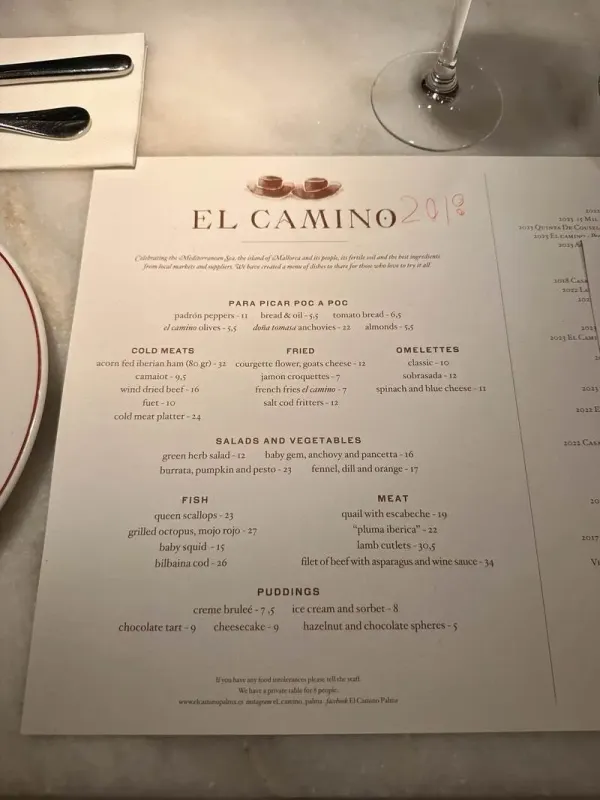
Almost every translation app on the App Store now sticks a camera button on the home screen — yet pointing your iPhone at a handwritten trattoria chalkboard, a European parking pole, or a Japanese skincare bottle produces wildly different results depending on whether the app simply paints translated words on top of pixels or actually explains what you are looking at.

On this page (14 sections)
- The short version
- Which to pick
- Two Completely Different Ways iPhone Camera Translation Works
- The 5 Best iPhone Camera Translators Compared
- 1. Ask Lucy — Best Overall for Eating, Shopping, and Real Travel Decisions
- 2. Google Translate Camera — Best Free Offline AR Scanner
- 3. Apple Translate & iOS Live Text — Best Built-In Backup
- 4. Naver Papago — Best Free Camera Companion for Korea & Japan
- 5. DeepL — Best for Clean European Prose
- Need Live Spoken Interpreting Too?
- Feature comparison
- Our verdict
- Common questions
- Try Ask Lucy free
Which iPhone camera translator should you install?
Keep Apple Translate (already built into iOS) or Google Translate with downloaded offline packs for zero-signal signs and quick walk-by scanning. For restaurant menus, food allergies, pharmacy boxes, receipts, and hotel Wi-Fi sheets, Ask Lucy turns up to 4 photos into plain-English explanations, home-first prices, Safety verdicts, and one-tap iOS actions.
Pick Ask Lucy when…
- You want menus, chalkboard specials, pharmacy boxes, and mystery appliance panels explained in context — not just word-for-word AR overlays
- You want up to 4 photos analyzed together (multi-page menus or front-and-back labels) with automatic Blurry/Too dark flags and a low-light Light button
- You care about Home-first Price list cards, four-state allergy Safety verdicts, Show-your-server cards, one-tap Join Wi-Fi Details cards, and Lock Screen quick launch
Pick Apple Translate, Google Translate, Papago, or DeepL when…
- You need completely offline on-device camera translation inside airplane-mode dead zones (Apple Translate and Google Translate shine here)
- You want a live AR floating overlay to scan street signs or aisle headers while walking without waiting for an explanation
- You want a completely free utility for casual text translation or live two-way spoken interpreting (use Apple/Google Translate Conversation mode, or Let's Tango for spoken Japanese)
Two Completely Different Ways iPhone Camera Translation Works
Not every iPhone camera translator is solving the same problem. Look closely at the top App Store options and they split neatly into two categories:
- AR Live-Text Overlays (Google Translate, Apple Translate, Papago). Point your lens at a sign and the app paints translated English directly over the original letters on screen. It feels instant on crisp printed words like “Ausgang” or “Ticket Office” — and frustratingly fragile on handwritten chalkboards, dense wine lists, or foreign labels where literal words still leave you guessing.
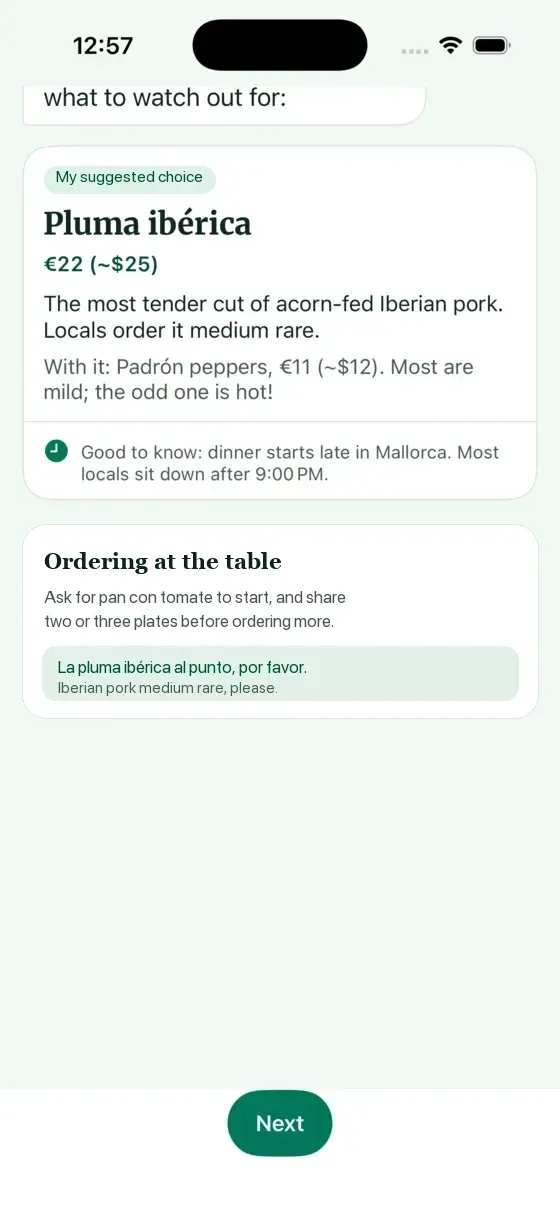
- Context-First Photo Companions (Ask Lucy). Instead of squeezing tiny English text back onto a cramped photo, you snap up to 4 photos in one turn and have an actual back-and-forth conversation about what you are holding: what the dishes taste like, what allergens hide inside the sauce, what everything costs in your home currency, or which button starts a cold wash.
Understanding that split makes choosing the right iPhone camera apps effortless.
The 5 Best iPhone Camera Translators Compared
| App | Best job on iPhone | Offline camera? | Multi-photo + follow-up? | Allergy & price smarts? | Cost |
|---|---|---|---|---|---|
| Ask Lucy | Menus, food allergies, pharmacies, receipts, hotel Wi-Fi cards | No (Offline outbox queues until signal returns) | Up to 4 photos + full chat | 4-state Safety verdicts + Home-first Price list cards | 1 free scan; 3-day trial then $5.99/wk, $9.99/mo, or $39.99/yr |
| Google Translate | Fast AR sign scanning & broad offline language packs | Yes (downloadable packs) | Single frame AR / import | None | Free |
| Apple Translate (+ Live Text) | Built-in zero-setup iOS offline backup & native Photos text | Yes (downloadable packs) | Single frame / Photos | Basic tap-to-call / URL via Live Text | Free (built into iOS) |
| Naver Papago | Everyday Korean & Japanese printed signs and brush-select lines | No (text/voice offline only) | Single frame brush select | None | Free |
| DeepL | Clean European prose on printed plaques, letters, and notices | No | Single frame OCR | None | Free tier / Pro subscription |
1. Ask Lucy — Best Overall for Eating, Shopping, and Real Travel Decisions
Built natively for iPhone and iPad (iOS 26+), Ask Lucy launches straight from a Lock Screen widget whenever a menu, medicine box, parking pole, or hotel welcome sheet lands in your hand:
- Multi-photo capture with guardrails. Send up to 4 photos in one turn (front + back medicine labels or a multi-page menu + allergen legend). Automatic Blurry / Too dark checks, a low-light Light button, and Resumable streaming keep dim restaurants and shaky Wi-Fi painless.
- Home-first Price list cards. Snap a market wall or café board for home-currency-first pricing (
A$419 (฿9,900),$25 (€22)) at live rates, plus instant typed currency switching with Undo. - One-tap Details cards. Photograph a Wi-Fi card or closed pharmacy notice and Lucy pulls a structured Details card with Join Wi-Fi (iOS Hotspot Configuration), Call, Email, Open, Apple Maps Directions, and Copy.
- Allergy safety & accessibility. Save allergies (
mild,moderate, orsevere) behind explicit Health consent so dish and ingredient photos return dedicated four-state Safety verdicts (Safe, Caution, Unsafe, or Unknown — never guessing Safe from a dish name alone) alongside full-screen Show-your-server cards. Pregnancy (also behind Health consent), Diet, and Notes to Lucy (up to 2,000 chars) shape Lucy’s reply text automatically without generating Safety verdict cards, and the whole interface supports iOS Dynamic Type and VoiceOver.
Medical & allergy note: Ask Lucy is not a doctor or pharmacist and cannot guarantee cross-contact-free kitchens — always confirm severe allergies directly with staff using the Show-your-server card, carry prescribed medication (such as an EpiPen), and verify OTC dosing with a licensed pharmacist.
Honest limits: iPhone and iPad only (no Android), requires connectivity (Offline outbox queues photos offline rather than translating on-device), and is photo + text chat rather than live spoken interpreting.
2. Google Translate Camera — Best Free Offline AR Scanner
Google Translate remains the best free, offline AR scanner. Download your destination pack over hotel Wi-Fi to read station boards and shop doors even in airplane mode. It only falls short once text turns handwritten, vertical, or culinary — where literal overlays jitter and miss hidden ingredients or cover charges.
3. Apple Translate & iOS Live Text — Best Built-In Backup
Already installed on every iPhone, Apple Translate and Live Text translate camera frames, Photos screenshots, and spoken conversations offline once packs are downloaded. Simple, private, and free — just strictly word-for-word.
4. Naver Papago — Best Free Camera Companion for Korea & Japan
For Seoul and Tokyo trips, Naver Papago excels at natural Korean and Japanese phrasing, and its brush-to-select photo tool keeps busy storefronts tidy — though it skips currency conversion, multi-photo turns, and hidden-allergen checks.
5. DeepL — Best for Clean European Prose
DeepL excels on neatly printed European paragraphs (museum plaques, rental agreements, hotel notices), though it lacks live AR street-sign speed and menu/allergy tools.
Need Live Spoken Interpreting Too?
For live back-and-forth spoken conversations, pair your camera app with Apple Translate or Google Translate Conversation mode — or our sister app Let’s Tango for natural two-way spoken Japanese.
Explore 10 Surprising Things You Can Translate with Lucy, Ask Lucy vs Apple Translate, Ask Lucy vs DeepL, and Best Offline Translation Apps.
Feature comparison
| Feature | Lucy | Google Translate, Apple Translate & Papago | Notes |
|---|---|---|---|
| Real-World Menu & Dish Explanations | Excellent | Fair | Live AR overlays translate dish names literally without explaining cooking methods, cuts, or local customs. Ask Lucy unpacks what each dish actually is and lets you ask follow-up questions. |
| Multi-Photo Analysis (Front + Back) | Excellent | Fair | Ask Lucy lets you send up to 4 photos in a single turn — ideal for multi-page menus, menu + allergen footnote legends, or front-and-back medicine boxes — with Blurry/Too dark checks before sending. |
| Allergen Safety Verdicts & Dietary Context | Excellent | N/A | Save allergies (mild, moderate, or severe) behind explicit Health consent for automatic four-state Safety verdicts (Safe, Caution, Unsafe, Unknown) plus Show-your-server cards; Pregnancy (also behind Health consent), Diet, and Notes to Lucy shape Lucy's replies automatically without generating Safety verdict cards. |
| Home-First Price Conversion | Excellent | N/A | Ask Lucy extracts prices straight from photos in your home currency first ($25 (€22)) inside expandable Price list cards at live rates, with instant chat currency switching. |
| Actionable Details Cards (Join Wi-Fi, Maps) | Excellent | Fair | iOS Live Text lets you tap phone numbers or URLs; Ask Lucy goes further by pulling structured Details cards with one-tap Join Wi-Fi (iOS Hotspot Configuration), Call, Email, Open, Apple Maps Directions, and Copy. |
| True Offline On-Device Translation | Fair | Excellent | Honest boundary: Ask Lucy requires Wi-Fi or mobile data to generate answers (its Offline outbox queues photos taken offline and sends automatically when signal returns). Apple Translate and Google Translate offer true on-device offline packs. |
| Spoken Two-Way Voice Interpreting | N/A | Excellent | Ask Lucy is photo and text chat only. Use Apple Translate or Google Translate Conversation mode for live voice, or sister app Let's Tango for live two-way spoken Japanese. |
Real-World Menu & Dish Explanations
Live AR overlays translate dish names literally without explaining cooking methods, cuts, or local customs. Ask Lucy unpacks what each dish actually is and lets you ask follow-up questions.
Multi-Photo Analysis (Front + Back)
Ask Lucy lets you send up to 4 photos in a single turn — ideal for multi-page menus, menu + allergen footnote legends, or front-and-back medicine boxes — with Blurry/Too dark checks before sending.
Allergen Safety Verdicts & Dietary Context
Save allergies (mild, moderate, or severe) behind explicit Health consent for automatic four-state Safety verdicts (Safe, Caution, Unsafe, Unknown) plus Show-your-server cards; Pregnancy (also behind Health consent), Diet, and Notes to Lucy shape Lucy's replies automatically without generating Safety verdict cards.
Home-First Price Conversion
Ask Lucy extracts prices straight from photos in your home currency first ($25 (€22)) inside expandable Price list cards at live rates, with instant chat currency switching.
Actionable Details Cards (Join Wi-Fi, Maps)
iOS Live Text lets you tap phone numbers or URLs; Ask Lucy goes further by pulling structured Details cards with one-tap Join Wi-Fi (iOS Hotspot Configuration), Call, Email, Open, Apple Maps Directions, and Copy.
True Offline On-Device Translation
Honest boundary: Ask Lucy requires Wi-Fi or mobile data to generate answers (its Offline outbox queues photos taken offline and sends automatically when signal returns). Apple Translate and Google Translate offer true on-device offline packs.
Spoken Two-Way Voice Interpreting
Ask Lucy is photo and text chat only. Use Apple Translate or Google Translate Conversation mode for live voice, or sister app Let's Tango for live two-way spoken Japanese.
Our verdict
Every iPhone traveler benefits from a two-app camera setup: Apple Translate or Google Translate loaded with offline language packs for zero-signal signs and quick walk-by glances, plus Ask Lucy on your Lock Screen for every menu, pharmacy label, price wall, receipt, and Wi-Fi card where context actually saves money, stress, or ordering guesswork.
Common questions
Does the iPhone already have a built-in camera translator?
Yes. Apple's built-in Translate app includes a Camera tab, and iOS Live Text lets you translate printed text right inside the native Camera and Photos apps for free — including offline once you download language packs. It is great for simple signs and printed paragraphs, though it only translates literal words without explaining dishes, hidden allergens, or currency conversions.
What makes Ask Lucy different from AR overlay camera translators?
AR overlay apps (like Google Translate Camera and Apple Translate Camera) replace foreign pixels with floating English words in place. That works neatly on street signs, yet breaks down on vertical handwriting, tightly spaced menus, and ingredient traps. Ask Lucy analyzes up to 4 photos together with modern multimodal vision-language models to explain what dishes or labels mean, convert prices home-first, flag saved allergies, and pull one-tap Details cards.
Can Ask Lucy translate camera photos offline on iPhone?
No — Ask Lucy needs Wi-Fi or cellular data to analyze photos. If you snap a menu or sign inside a dead zone, Lucy's Offline outbox queues the photo on your iPhone and sends it automatically the moment you reconnect. For guaranteed airplane-mode translation, download offline language packs in Apple Translate or Google Translate before departure.
How much does Ask Lucy cost on iPhone?
Ask Lucy (iPhone and iPad, iOS 26+) includes 1 free photo scan with no credit card required so you can try it on a real menu or label first. After that, all plans include a 3-day free trial: Weekly ($5.99), Monthly ($9.99), or Yearly ($39.99).