

Best Currency Converter & Price-Tag Scanner Apps in 2026: Honest Comparison
Last updated
Converting a single hotel bill is easy in almost any calculator. Converting twenty dishes on a Japanese menu wall, a shelf of French pharmacy skincare, or a crumpled Thai market receipt — while figuring out what the item actually is — exposes the huge gap between typing numbers by hand and snapping one photo.

On this page (14 sections)
- The short version
- Which to pick
- Why Typing Prices Into a Calculator Gets Old Fast Abroad
- 5 Best Currency Converter & Camera Price Apps Compared
- 1. Ask Lucy — Best for Scanning Menus, Price Walls, and Receipts on iPhone
- 2. XE Currency — Best Free Offline Rate Backup
- 3. Elk — Best One-Handed Table Converter (Especially on Apple Watch)
- 4. Apple Calculator — Best Built-In Zero-Install Option
- 5. Google Lens — Best Free Single-Tag Camera Lookup
- Four Foreign Price Traps No Number-Only Converter Warns You About
- Feature comparison
- Our verdict
- Common questions
- Try Ask Lucy free
Which currency converter app belongs on your phone?
Use Ask Lucy on iPhone or iPad whenever prices live inside foreign menus, pharmacy racks, market signs, or receipts — one photo gives you translated items plus Home-first prices ($25 (€22)) inside clean Price list cards at live rates. Pair it with XE Currency or Elk for instant offline cached exchange rates whenever you have zero signal or just need to check a single number.
Pick Ask Lucy when…
- You want to photograph an entire menu, shop shelf, or receipt (up to 4 photos per turn) and see every item translated with Home-first prices at once
- You want expandable Price list cards at live exchange rates without manually punching numbers into a keypad
- You cross borders or travel with international friends and want instant typed currency switching in chat (with one-tap Undo)
Pick XE Currency, Elk, Apple Calculator, or Google Lens when…
- You need reliable offline conversions using cached exchange rates on a flight, cruise ship sea day, or remote bazaar (XE Currency and Elk excel here)
- You want a free, zero-install built-in iOS converter for quick single-number math (Apple Calculator)
- You use an Android phone or just want a quick free barcode/single-tag camera lookup (Google Lens + XE Currency)
Why Typing Prices Into a Calculator Gets Old Fast Abroad
If a souvenir vendor says “40 euros,” you do not need a camera — you glance at a quick converter or do rough mental math and move on.
The friction hits when prices come in batches wrapped in another language: a 28-item ramen ticket machine in Tokyo, a wall of Don Quijote shelf tags showing both pre-tax and post-tax yen in tiny kanji, a seaside Croatian menu pricing fish per kilogram (€/kg), or an itemized café receipt where you are trying to figure out what the extra €6 line actually charged you for.
Punching ten numbers one by one into a keypad while holding your bag is miserable. Here is how five genuinely useful tools handle foreign prices — from full-photo menu scanning to zero-signal offline math.
5 Best Currency Converter & Camera Price Apps Compared
| App | Best job abroad | Scans multi-item menus, shelves & receipts? | Translates items & fine print? | Offline cached rates? | Platforms |
|---|---|---|---|---|---|
| Ask Lucy | Menus, pharmacy shelves, market walls & receipts | Yes (up to 4 photos/turn into Price list cards) | Yes (dishes, taxes, cover charges, ingredients) | No (Offline outbox queues photos until signal returns) | iPhone & iPad (iOS 26+) |
| XE Currency | Classic all-purpose converter & offline rate backup | No (manual entry) | No | Yes (cached last-updated rates) | iOS, Android & web |
| Elk | Lightning-fast swipeable price table on iPhone & Apple Watch | No (table lookup) | No | Yes (cached offline table) | iPhone & Apple Watch |
| Apple Calculator | Zero-download built-in iPhone single-number math | No (manual entry) | No | Yes (caches last-fetched rates; needs signal to refresh) | Built into iOS |
| Google Lens | Free single price-tag or barcode web lookup | Single printed tags only (inconsistent on menus) | Basic literal OCR | No | iOS & Android |
1. Ask Lucy — Best for Scanning Menus, Price Walls, and Receipts on iPhone
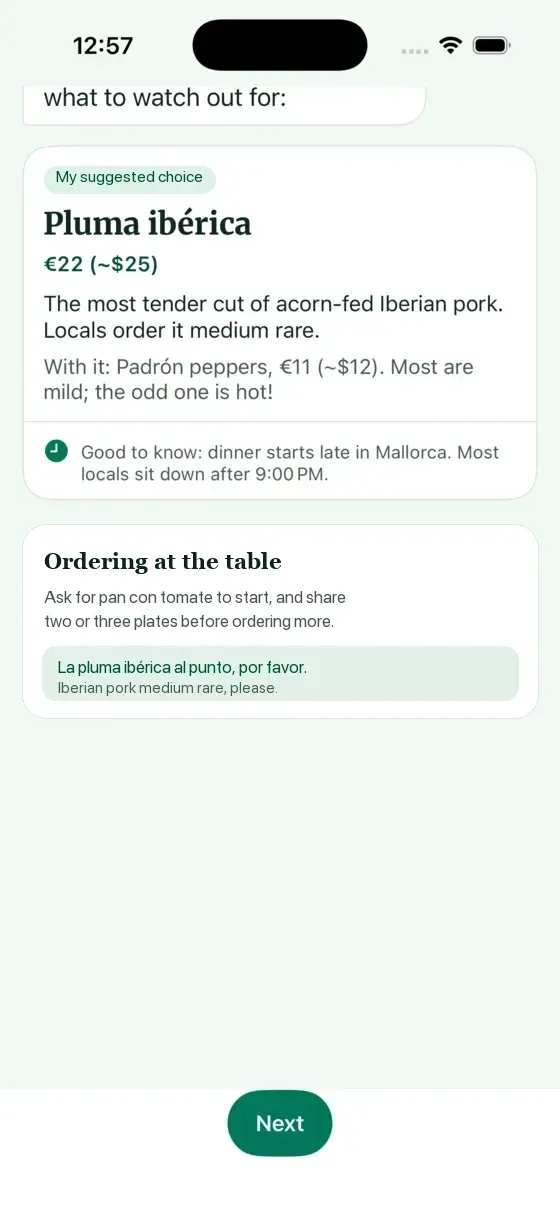
Rather than making you jump back and forth between a translator and a calculator, Ask Lucy (native to iPhone and iPad, iOS 26+) reads the whole photo once — launched straight from a Lock Screen widget — and turns every line into plain English with Home-first prices ($25 (€22), A$419 (฿9,900)) calculated at live exchange rates:
- Expandable Price list cards. Photograph up to 4 pages of a menu, souvenir rack, or bakery case in a single turn (with automatic Blurry / Too dark flags and a low-light Light button). Lucy extracts every item and price cleanly into a scannable Price list card.
- Catches hidden pricing fine print. A raw number converter cannot tell you that a Japanese tag lists zeinuki (tax-excluded) in big bold print and zeikomi (tax-included) in small type underneath, that an Italian menu charges €3 per-person coperto, or that Adriatic fish is priced per 100 g or per kilo. Lucy flags the fine print alongside the home-first price.
- Typed currency switching with Undo. Hopping from London to Paris to Zurich on a rail pass — or splitting a bill with an Australian friend? Type “switch to GBP” or “show prices in AUD” right inside your chat and Lucy updates your home currency instantly with a one-tap Undo card.
Honest limits: iPhone and iPad only (no Android); requires Wi-Fi or mobile data to process photos and fetch live rates (Offline outbox queues shots taken offline rather than converting on-device); paid after 1 free photo scan (no card) and a 3-day free trial ($5.99/wk, $9.99/mo, or $39.99/yr).
2. XE Currency — Best Free Offline Rate Backup
XE Currency has stayed on travelers’ phones for years for one rock-solid reason: it caches the latest live exchange rates automatically, so you can convert accurately inside an airplane cabin, an underground souk, or a sea day on a cruise with zero roaming data. It also tracks multiple currencies simultaneously and works on both Android and iPhone — just strictly manual entry.
3. Elk — Best One-Handed Table Converter (Especially on Apple Watch)
If you hate typing on tiny calculator buttons while bargaining at a market stall, Elk replaces the keypad with a smart, location-aware 10-row conversion cheat sheet (e.g., 100 / 200 / 300… yen or baht side by side with your home currency). Swipe left or right to multiply or divide by 10, tap any row to drill into finer values, glance right on your Apple Watch, and rely on cached offline rates when signal dips. Zero camera scanning or translation, though unmatched for single-glance market math.
4. Apple Calculator — Best Built-In Zero-Install Option
Since iOS 18, Apple’s own Calculator app includes a clean built-in currency conversion toggle right inside the basic keypad (and iOS Spotlight search converts typed queries like ¥8,500 in USD in half a second). It is free, already installed, and clean — even working offline on its last cached rates — just manual one number at a time.
5. Google Lens — Best Free Single-Tag Camera Lookup
For Android travelers — or anyone pointing at a single large retail tag or packaged barcode — Google Lens can often identify the product and pull a quick conversion online. On multi-item restaurant menus, cursive chalkboards, or itemized foreign receipts, however, it falls apart quickly compared to structured multi-photo extraction.
Four Foreign Price Traps No Number-Only Converter Warns You About
Even with the best converter on your phone, watch for four everyday travel pricing wrinkles:
- Japan’s dual shelf tags: Big numbers often show pre-tax (税抜 / zeinuki) while smaller text shows the real register price (税込 / zeikomi, +8% takeaway food / +10% general & dine-in).
- Italy’s coperto & Japan’s otoshi: Standard per-person seated table charges listed in tiny print at the bottom of the menu — legitimate customs, not scams, yet easy to miss.
- Per-weight coastal seafood: Whole fish in Spain, Portugal, Italy, Greece, and Croatia is frequently priced per 100 g or per kilogram (
€/kg), not per plate. - Card-terminal Dynamic Currency Conversion (DCC): When a payment machine offers to charge your card in your home currency “for convenience,” politely pick the local currency instead so your own card network gives you the real exchange rate.
Explore real-world pricing guides in our Italian Coperto Cover Charge Guide, Don Quijote Japan Shopping & Tax-Free Guide, Tipping Etiquette in Europe, Multi-Country Currency Tips, and Best Camera Translation App for iPhone.
Feature comparison
| Feature | Lucy | XE Currency, Elk, Apple Calculator & Google Lens | Notes |
|---|---|---|---|
| Multi-Item Menu, Shelf & Receipt Price Scanning | Excellent | Fair | XE, Elk, and Apple Calculator require manual number entry; Google Lens handles occasional single tags inconsistently. Ask Lucy reads up to 4 photos of dense menus, shelves, or receipts and builds a full Home-first Price list card. |
| Translates What You Are Buying Alongside the Price | Excellent | Poor | Knowing ¥1,980 is ~$13 does not tell you whether the bottle is sunscreen or hair conditioner, or whether tax is already included. Ask Lucy explains the item, tax/cover-charge fine print, and home-first price together. |
| Offline Cached Exchange Rates | Fair | Excellent | Honest limit: Ask Lucy needs Wi-Fi or mobile data to process photos and fetch live rates (Offline outbox queues photos until signal returns). XE Currency and Elk cache recent rates for smooth offline math. |
| One-Handed Speed for a Single Number | Good | Excellent | If a taxi driver quotes 650 baht out loud, Elk's swipeable 10-row cheat sheet (including Apple Watch) or Apple Calculator beats opening any camera. |
| Instant Mid-Chat Currency Switching | Excellent | Good | Type 'switch to GBP' or 'switch to AUD' right inside an Ask Lucy chat (with Undo) without digging through settings menus. |
| Actionable Extras From Receipts & Signs | Excellent | N/A | Ask Lucy also extracts addresses, phone numbers, websites, and hotel Wi-Fi credentials from photos into one-tap Details cards (Join Wi-Fi, Apple Maps Directions, Call, Copy). |
| Platform & Pricing | Good | Excellent | Apple Calculator and Google Lens are free; XE and Elk have free/affordable tiers across platforms (Elk is iOS/watchOS). Ask Lucy is iPhone and iPad only (iOS 26+), with 1 free scan + 3-day free trial ($5.99/wk, $9.99/mo, $39.99/yr). |
Multi-Item Menu, Shelf & Receipt Price Scanning
XE, Elk, and Apple Calculator require manual number entry; Google Lens handles occasional single tags inconsistently. Ask Lucy reads up to 4 photos of dense menus, shelves, or receipts and builds a full Home-first Price list card.
Translates What You Are Buying Alongside the Price
Knowing ¥1,980 is ~$13 does not tell you whether the bottle is sunscreen or hair conditioner, or whether tax is already included. Ask Lucy explains the item, tax/cover-charge fine print, and home-first price together.
Offline Cached Exchange Rates
Honest limit: Ask Lucy needs Wi-Fi or mobile data to process photos and fetch live rates (Offline outbox queues photos until signal returns). XE Currency and Elk cache recent rates for smooth offline math.
One-Handed Speed for a Single Number
If a taxi driver quotes 650 baht out loud, Elk's swipeable 10-row cheat sheet (including Apple Watch) or Apple Calculator beats opening any camera.
Instant Mid-Chat Currency Switching
Type 'switch to GBP' or 'switch to AUD' right inside an Ask Lucy chat (with Undo) without digging through settings menus.
Actionable Extras From Receipts & Signs
Ask Lucy also extracts addresses, phone numbers, websites, and hotel Wi-Fi credentials from photos into one-tap Details cards (Join Wi-Fi, Apple Maps Directions, Call, Copy).
Platform & Pricing
Apple Calculator and Google Lens are free; XE and Elk have free/affordable tiers across platforms (Elk is iOS/watchOS). Ask Lucy is iPhone and iPad only (iOS 26+), with 1 free scan + 3-day free trial ($5.99/wk, $9.99/mo, $39.99/yr).
Our verdict
Every traveler benefits from two currency tools that never compete with each other: XE Currency or Elk for lightning-fast, offline single-number checks, and Ask Lucy on your Lock Screen whenever prices are buried inside foreign menus, pharmacy shelves, tax-free racks, or itemized receipts.
Common questions
Is there an iPhone app that scans a whole restaurant menu and converts all the prices?
Yes. Ask Lucy (iPhone and iPad, iOS 26+) lets you photograph up to 4 pages of a menu, shop price board, or receipt in a single turn and displays every item translated alongside Home-first prices (such as $25 (€22) or A$419 (฿9,900)) inside clean, expandable Price list cards calculated at live exchange rates.
Does the iPhone have a built-in currency converter?
Yes. Apple's built-in Calculator app (iOS 18 and later) includes a native currency conversion toggle right inside the basic calculator — and iOS Spotlight search and Notes also convert typed amounts like '4500 JPY to USD' when online. It is free and handy for single numbers, though it requires typing prices manually and cannot read menus or tags.
Which currency converter apps work offline without roaming data?
XE Currency and Elk both cache their most recent exchange rates on your phone so you can convert prices reliably in airplane mode, underground markets, or cruise sea days. Ask Lucy requires Wi-Fi or mobile data to analyze photos and pull live rates (photos snapped offline wait in Lucy's Offline outbox until connectivity returns).
Can Google Lens scan and convert foreign price tags?
Sometimes — on a clean, large, single printed price tag or product barcode with good lighting and mobile data, Google Lens can recognize the price and offer a conversion or web lookup. It struggles on multi-item menus, handwritten chalkboard prices, dual tax-excluded/tax-included Japanese labels, and itemized receipts.
Why should I still pay in the local currency on foreign credit card terminals?
No matter which converter app you use to check prices, always choose the LOCAL currency (EUR, JPY, GBP, THB) when a foreign card terminal or ATM asks if you want to be billed in your home currency. Choosing your home currency triggers Dynamic Currency Conversion (DCC), which quietly adds steep markups on top of the live exchange rate.