

Best Menu Translator App for iPhone in 2026: An Honest Comparison
Last updated
Translating a street sign takes two seconds of literal OCR. Translating a restaurant menu — handwritten chalkboards in dim candlelight, vertical Japanese izakaya strips, regional dish names with zero English equivalent, hidden allergens, and foreign currency math — is a completely different test. Here is how five leading iPhone apps actually perform at the dinner table.

On this page (14 sections)
- The short version
- Which to pick
- Why Translating a Menu Is Harder Than Translating a Sign
- 5 Best iPhone Menu Translator Apps Compared
- 1. Ask Lucy — Best Overall for Actually Deciding What to Order
- 2. Google Translate Camera — Best Free Offline Menu Backup
- 3. Apple Translate & iOS Live Text — Best Built-In Backup
- 4. Naver Papago — Best Free Menu Reader for South Korea & Japan
- 5. DeepL — Best for Clean European Menu Paragraphs
- What About Talking to Your Waiter?
- Feature comparison
- Our verdict
- Common questions
- Try Ask Lucy free
Which menu translator app should you install on iPhone?
Install Ask Lucy if you want restaurant menus genuinely explained — dish descriptions, hidden allergens checked against your Profile, Home-first prices, and local-language Show-your-server cards from up to 4 photos at once. Keep Apple Translate or Google Translate loaded with downloaded offline language packs alongside it as your free, zero-signal basement backup.
Pick Ask Lucy when…
- You want dishes actually explained — cuts, sauces, spice levels, and table charges — instead of stiff word-for-word overlays
- You face dim restaurants, handwritten chalkboards, vertical Japanese/Chinese menus, or multi-page wine and food booklets (up to 4 photos per turn)
- You want saved allergies checked automatically (Safe, Caution, Unsafe, Unknown), Home-first Price list cards, and full-screen Show-your-server cards
Pick Google Translate, Apple Translate, DeepL, or Papago when…
- You dine in basement cellars or rural spots with zero mobile signal and need true on-device offline translation (Google Translate or Apple Translate)
- You want a completely free utility for quick literal glances at crisp printed menus
- You need live two-way spoken conversation interpreting at the table (use Apple/Google Translate Conversation mode, or Let's Tango for spoken Japanese)
Why Translating a Menu Is Harder Than Translating a Sign
Point almost any iPhone camera translator at a railway exit sign and it works like magic. Point that same app at a handwritten trattoria chalkboard in Bologna or hanging wooden strips behind a Tokyo izakaya counter and the wheels fall off fast.
Menus are not neat sentences. They are culinary shorthand — regional dish names (cacio e pepe, otoshi, chawanmushi, blanquette de veau), cramped cursive, dim amber bulbs, tiny footnote symbols for cover charges or EU allergens, and prices in yen, baht, or euros you still have to convert in your head while the server hovers.
Here is how five popular iPhone apps actually handle real restaurant menus — including where free tools genuinely beat paid ones.
5 Best iPhone Menu Translator Apps Compared
| App | Best menu job | Dish explanations? | Handwritten & multi-page? | Allergy & Home-first prices? | Offline camera? | Price |
|---|---|---|---|---|---|---|
| Ask Lucy | Sit-down dining, chalkboards, allergies, wine & price lists | Full explanations + chat Q&A | Up to 4 photos + Blurry/Too dark checks & Light button | 4-state Safety verdicts + Home-first Price list cards + Show-your-server cards | No (Offline outbox queues until signal returns) | 1 free scan; 3-day trial then $5.99/wk, $9.99/mo, or $39.99/yr |
| Google Translate | Free offline menu backup & quick printed glances | Literal word swap only | Single AR frame; shaky on cursive/vertical kanji | None | Yes (downloadable packs) | Free |
| Apple Translate (+ Live Text) | Built-in zero-setup iPhone backup | Literal word swap only | Single frame / Photos app | None | Yes (downloadable packs) | Free (built into iOS) |
| Naver Papago | Free Korean & Japanese printed menus | Literal (natural KR/JP phrasing) | Single frame + brush-to-select | None | No (camera needs signal) | Free |
| DeepL | Clean European tasting-menu prose & wine notes | Clean prose, no culinary Q&A | Single frame printed OCR | None | No | Free tier / Pro plans |
1. Ask Lucy — Best Overall for Actually Deciding What to Order
Built natively for iPhone and iPad (iOS 26+) and accessible in one tap from a Lock Screen widget, Ask Lucy skips jittery AR overlays in favor of explaining the menu the way a knowledgeable local friend sitting across the booth would:
- Up to 4 photos in a single turn. Shoot two pages of mains, the daily chalkboard, and the allergen legend together. Automatic Blurry and Too dark flags catch bad shots before they send, an auto Light button brightens dim bistros, and Resumable streaming keeps replies intact on flaky café Wi-Fi.
- Real culinary answers + follow-ups. Instead of translating agedashi tofu literally as “deep-fried tofu,” Lucy explains the crispy lightly battered tofu swimming in warm bonito-and-soy broth — and lets you ask “Which starters aren’t heavy?” or “Which local wine pairs with the lamb?”
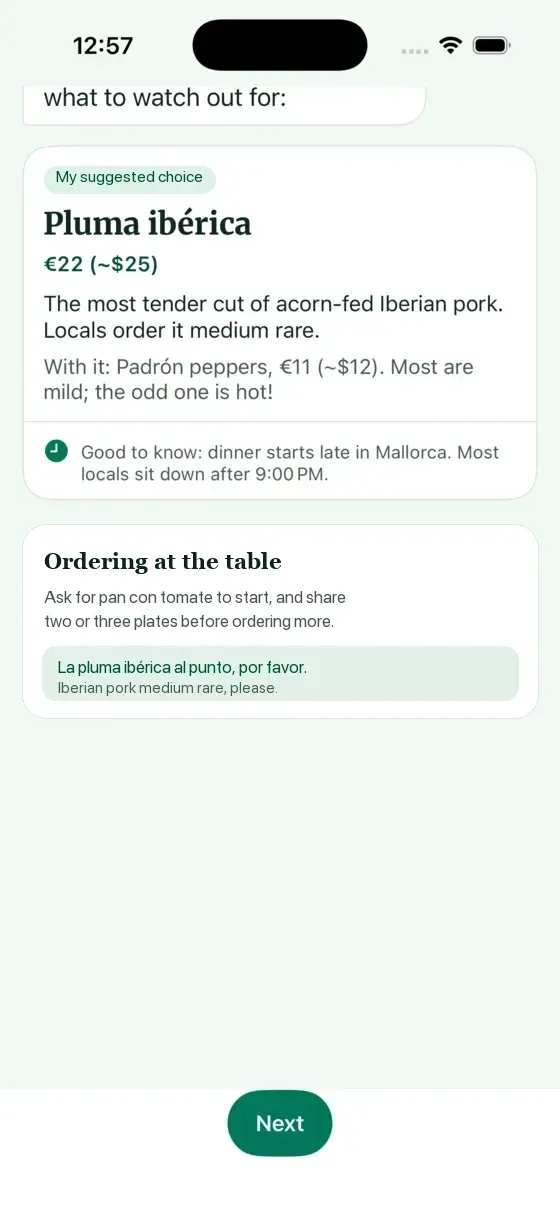
- Home-first Price list cards. Menu prices appear in your home currency first (
$25 (€22),A$419 (฿9,900)) at live exchange rates, with typed currency switching (and Undo) if you want to check another currency. - Allergies, Diet, Pregnancy & Show-your-server cards. Save allergies with Severity (
mild,moderate, orsevere) once behind explicit Health consent (health data is never passively inferred) so Lucy runs dedicated four-state Safety verdicts (Safe, Caution, Unsafe, or Unknown — never guessing Safe from a dish name alone) and generates a full-screen Show-your-server card in the local language. Pregnancy (also behind Health consent), Diet (vegetarian/vegan/pescatarian/gluten-free), and Notes to Lucy (up to 2,000 characters) shape every menu reply automatically without Verdict cards. (Always confirm severe allergies directly with kitchen staff and carry prescribed medication.)
Honest limits: iPhone and iPad only (no Android), needs Wi-Fi or mobile data to analyze menus (its Offline outbox queues photos rather than translating on-device), and is photo + text chat rather than live spoken interpreting.
2. Google Translate Camera — Best Free Offline Menu Backup
If you walk down stone stairs into a vaulted Roman cellar where your eSIM drops to zero bars, Google Translate with a downloaded offline language pack still reads crisp printed dishes on the spot. It is also completely free, works on Android, and includes two-way spoken Conversation mode. Its weakness is strictly culinary: literal AR text misses cooking methods, table cover charges, and hidden allergens, and stumbles over handwriting and vertical menus.
3. Apple Translate & iOS Live Text — Best Built-In Backup
Already sitting on your iPhone with zero sign-in, Apple Translate and native iOS Live Text let you snap a menu photo in the standard Camera app and translate printed text offline once language packs are downloaded. Clean, fast, and private — just strictly literal word-for-word translation.
4. Naver Papago — Best Free Menu Reader for South Korea & Japan
On trips to Seoul, Busan, Tokyo, or Osaka, Naver Papago consistently produces smoother literal Korean and Japanese food translations than general AR overlays, and its brush-to-select photo tool keeps crowded menus readable. It still stops at literal translation (no hidden-stock warnings, no multi-photo Q&A, no currency conversion, and no offline camera mode).
5. DeepL — Best for Clean European Menu Paragraphs
At formal French, Italian, Spanish, or German restaurants with long printed descriptions and sommelier notes, DeepL turns stiff menu prose into graceful English. It just is not built for dark chalkboards, multi-page menu scanning, allergy checking, or price conversion.
What About Talking to Your Waiter?
Photo menu translators help you read the menu, not hold a rapid-fire back-and-forth conversation. When you need live two-way spoken interpreting at a counter, use Apple Translate or Google Translate Conversation mode — or our sister app Let’s Tango for natural live two-way spoken Japanese.
Compare more travel setups in Google Translate Camera vs Ask Lucy, Best Camera Translation App for iPhone, Best Menu Translation Apps for Food Allergies, and our Guide to Decoding Handwritten Menus Abroad.
Feature comparison
| Feature | Lucy | Google Translate, Apple Translate, DeepL & Papago | Notes |
|---|---|---|---|
| Dish Explanations & Culinary Context | Excellent | Fair | Literal AR translators turn 'otoshi' into 'pass through' and 'pesto alla genovese' into 'Genoese pesto.' Ask Lucy unpacks what each dish actually is, how it is cooked, and what local table customs apply — plus answers follow-up questions. |
| Handwritten & Multi-Page Menus | Excellent | Fair | Send up to 4 photos in a single turn (chalkboard specials + main menu + allergen legend + wine list) with automatic Blurry/Too dark checks and a low-light Light button instead of chasing jittery AR text. |
| Hidden Allergen Safety Verdicts | Excellent | N/A | Save allergies (mild, moderate, or severe) behind explicit Health consent for four-state Safety verdicts (Safe, Caution, Unsafe, Unknown — never guessing Safe from a dish name alone) and Show-your-server cards. Diet and Pregnancy shape replies automatically without Verdict cards. |
| Home-First Menu Pricing | Excellent | N/A | Ask Lucy builds expandable Price list cards in your home currency first ($25 (€22)) at live rates, with typed currency switching (and Undo) mid-chat. |
| True Offline Zero-Signal Mode | Fair | Excellent | Honest limit: Ask Lucy requires Wi-Fi or mobile data to generate replies (its Offline outbox queues photos taken offline and sends automatically when signal returns). Google Translate and Apple Translate run full on-device offline packs. |
| Korean & Japanese Printed Menu Phrasing (Free) | Excellent | Good | Naver Papago does a noticeably cleaner free literal translation of printed Korean and Japanese menus than generic AR tools, though without dish explanations, allergy checks, or price conversion. |
| Live Two-Way Voice Ordering | N/A | Excellent | Ask Lucy is photo + text chat only. Use Apple Translate or Google Translate Conversation mode for live voice, or sister app Let's Tango (lets-tango.com) for natural two-way spoken Japanese. |
Dish Explanations & Culinary Context
Literal AR translators turn 'otoshi' into 'pass through' and 'pesto alla genovese' into 'Genoese pesto.' Ask Lucy unpacks what each dish actually is, how it is cooked, and what local table customs apply — plus answers follow-up questions.
Handwritten & Multi-Page Menus
Send up to 4 photos in a single turn (chalkboard specials + main menu + allergen legend + wine list) with automatic Blurry/Too dark checks and a low-light Light button instead of chasing jittery AR text.
Hidden Allergen Safety Verdicts
Save allergies (mild, moderate, or severe) behind explicit Health consent for four-state Safety verdicts (Safe, Caution, Unsafe, Unknown — never guessing Safe from a dish name alone) and Show-your-server cards. Diet and Pregnancy shape replies automatically without Verdict cards.
Home-First Menu Pricing
Ask Lucy builds expandable Price list cards in your home currency first ($25 (€22)) at live rates, with typed currency switching (and Undo) mid-chat.
True Offline Zero-Signal Mode
Honest limit: Ask Lucy requires Wi-Fi or mobile data to generate replies (its Offline outbox queues photos taken offline and sends automatically when signal returns). Google Translate and Apple Translate run full on-device offline packs.
Korean & Japanese Printed Menu Phrasing (Free)
Naver Papago does a noticeably cleaner free literal translation of printed Korean and Japanese menus than generic AR tools, though without dish explanations, allergy checks, or price conversion.
Live Two-Way Voice Ordering
Ask Lucy is photo + text chat only. Use Apple Translate or Google Translate Conversation mode for live voice, or sister app Let's Tango (lets-tango.com) for natural two-way spoken Japanese.
Our verdict
Literal camera translators solve the language barrier on simple printed menus, yet leave you guessing on regional dishes, hidden sauces, handwriting, and currency math. Pair Ask Lucy on your Lock Screen for real sit-down dining with Apple Translate or Google Translate offline packs as your free zero-signal fallback.
Common questions
Why do regular camera translation apps struggle so much on restaurant menus?
Live AR camera translators are built to swap printed words one-for-one directly over the pixels. Restaurant menus break that assumption in four ways: messy chalkboard handwriting or vertical calligraphy, regional dish names with no literal English equivalent, invisible allergens (like bonito fish stock or pine nuts), and dim lighting where floating AR overlays flicker constantly.
Can Ask Lucy translate a multi-page restaurant menu at once?
Yes. Ask Lucy lets you snap up to 4 photos in a single turn on iPhone or iPad (iOS 26+) — for example, starters, mains, daily specials, and an EU numbered allergen footnote legend — and then ask follow-up questions like 'Which two mains are light, spicy, and under $20?'
Does Ask Lucy work in a basement restaurant with no Wi-Fi or cell service?
No — Ask Lucy needs Wi-Fi or mobile data to generate answers. If you photograph a menu offline, Lucy's Offline outbox queues the photo on your iPhone and sends it automatically as soon as connectivity returns. For guaranteed zero-signal menu reading, download offline language packs in Apple Translate or Google Translate before leaving your hotel.
How much does Ask Lucy cost compared to free menu translators?
Google Translate, Apple Translate, and Naver Papago are free (DeepL offers a free tier plus paid Pro plans). Ask Lucy (iPhone and iPad, iOS 26+) gives you 1 free photo scan with no card required, followed by a 3-day free trial on Weekly ($5.99), Monthly ($9.99), or Yearly ($39.99) plans.
Is there an Android version of Ask Lucy?
No — Ask Lucy is built natively for iPhone and iPad (iOS 26+). Android travelers get the best free menu setup by pairing Google Translate Camera (with offline packs) and Naver Papago for Japan and South Korea.