

Google Translate Camera vs Ask Lucy: Real Photo Examples Side by Side
Last updated
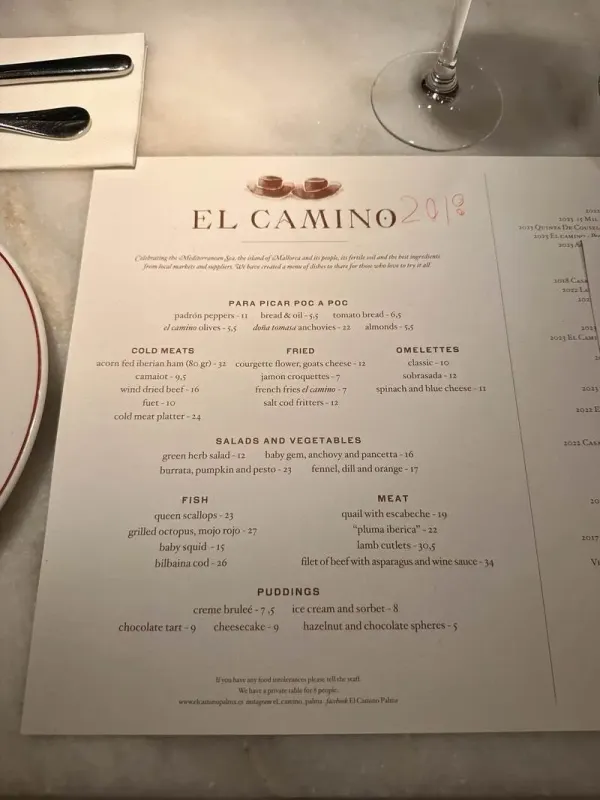
Google Translate's camera is fast, free, and already sitting on millions of phones — so why would an iPhone traveler ever open Ask Lucy instead? The clearest way to answer is to put four real travel photos side by side and compare what Google's AR overlay prints with what Ask Lucy actually explains.

On this page (12 sections)
- The short version
- Which to pick
- The Real Difference Shows Up in Four Everyday Photos
- 1. Handwritten Menus and Dim Lighting
- 2. Hidden Ingredients That Literal Translation Misses
- 3. Prices, Receipts, and Actionable Cards
- When Google Translate Camera Is Genuinely Better
- The Practical iPhone Combo
- Feature comparison
- Our verdict
- Common questions
- Try Ask Lucy free
Fast AR overlay vs real-world travel explanation
Google Translate Camera wins when you need a free, instant, offline overlay on street signs or printed labels — or if you use Android. Ask Lucy wins on iPhone and iPad whenever literal words are not enough: handwritten menus, hidden allergens, front-and-back pharmacy boxes, live home-first prices, and one-tap hotel Wi-Fi cards.
Pick Ask Lucy when…
- You are on iPhone or iPad (iOS 26+) facing handwritten menus, vertical Japanese calligraphy, multi-page wine lists, or front-and-back medicine boxes
- You want hidden ingredients flagged against your saved allergies (Safe, Caution, Unsafe, Unknown), plus full-screen Show-your-server cards
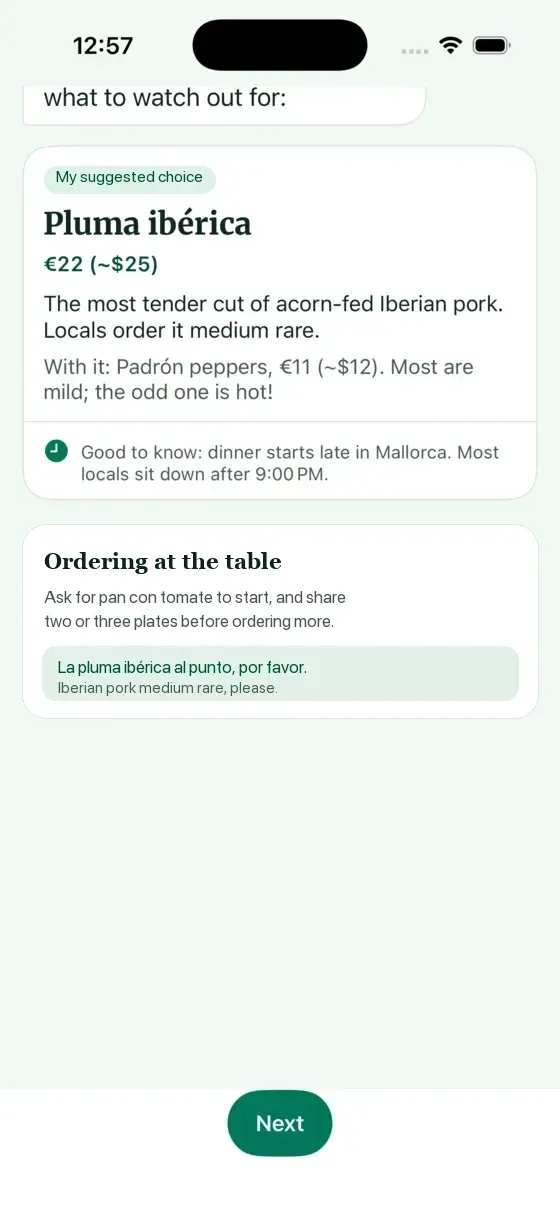
- You want prices converted into your home currency first ($25 (€22)) and Wi-Fi passwords, addresses, or phone numbers pulled into one-tap Details cards
Pick Google Translate Camera when…
- You have zero mobile signal and need completely offline on-device camera translation via downloaded language packs
- You carry an Android phone (Ask Lucy is iPhone and iPad only)
- You want a free, 2-second floating overlay on street signs, station boards, or aisle headers — or built-in spoken Conversation mode in the same app
The Real Difference Shows Up in Four Everyday Photos
Search for a photo translator before a trip and Google Translate Camera is the default answer — and for good reason. It is free, fast, works offline with downloaded packs, and translates a crisp subway sign in two seconds flat.
The gap between word-swapping and actually understanding what is in front of you only becomes obvious once you land. Below are four everyday travel photos showing what Google Translate’s live AR camera overlay outputs versus what Ask Lucy gives you on iPhone or iPad.
| Real travel photo | What Google Translate Camera prints | What Ask Lucy explains & builds |
|---|---|---|
Handwritten Japanese izakaya wooden strip (お通し ¥450 / 揚げ出し豆腐 ¥680) |
Jittery fragments over brush strokes: “Pass through 450 / Fried tofu 680” | Explains otoshi is the standard seated table appetizer ($3 (¥450)), unpacks agedashi tofu ($4.50 (¥680)), flags hidden bonito dashi fish stock + wheat soy sauce, and offers a Japanese Show-your-server card |
Italian menu line (Trofie al pesto alla genovese — €16) |
“Trofie with Genoese pesto — €16” | Explains twisted Ligurian wheat pasta with basil, garlic, Pecorino/Parmigiano, and pine nuts — returning Unsafe or Caution Safety verdicts for saved tree-nut, dairy, or wheat allergies (and flagging the wheat pasta in reply text for a gluten-free Diet), with $17.50 (€16) home-first pricing |
French pharmacy box (Doliprane 1000 mg — Paracétamol) |
Literal front-box text in one frame; tiny dosing panel translated separately | Lets you snap front, ingredients, and Posologie together (up to 4 photos in one turn); warns clearly that 1000 mg is double a US 500 mg extra-strength Tylenol caplet and checks saved allergies/pregnancy (always confirm with the pharmacist) |
| Japanese hotel Wi-Fi welcome sheet | Floating English pasted over the tiny password box — you still type O vs 0 by hand |
Summarizes breakfast and checkout hours and lifts a Details card with a one-tap Join Wi-Fi button (iOS Hotspot Configuration), Call, and Copy |
1. Handwritten Menus and Dim Lighting
Google Translate’s live AR camera expects clean, horizontal, well-lit print. Put it in front of a candlelit Parisian bistro chalkboard or vertical wooden strips hanging behind a Tokyo izakaya counter and the floating English labels jump around, clip mid-word, or skip cursive dishes altogether.
Ask Lucy captures a still shot instead of chasing shaky AR frames — with automatic Blurry and Too dark flags before upload and an automatic Light button in low light — and reads up to 4 photos in a single turn. You can shoot the chalkboard specials, the wine list, and the dessert card together and ask “Which two mains are lighter and under $25?”
2. Hidden Ingredients That Literal Translation Misses
The most stressful weakness of literal photo translation is false confidence around food allergies.
Google Translate faithfully tells you pesto alla genovese is “Genoese pesto” and jimami tofu is “jimami tofu.” Unless you already know Genovese pesto blends pine nuts and Parmigiano, or that Okinawan jimami tofu is made from peanuts instead of soybeans, the translation never warns you.
In Ask Lucy, you save your allergies (mild, moderate, or severe) once in your Profile behind explicit one-tap Health consent (health details are never passively inferred from chats) so every photographed menu or snack pack runs a dedicated four-state Safety verdict — Safe, Caution, Unsafe, or Unknown (where any unchecked or ambiguous dish is always Unknown, never guessed Safe) — alongside a full-screen Show-your-server card in the local language. Pregnancy (also behind Health consent) and Diet (not Health data) shape Lucy’s replies automatically without generating a Safety verdict card. (Ask Lucy is not a doctor or pharmacist — always confirm severe allergies directly with restaurant staff and carry prescribed medication.)
3. Prices, Receipts, and Actionable Cards
Google Translate leaves ¥3,850 or ฿9,900 right where it found them, sending you back to a calculator app while the server waits. Ask Lucy prints Home-first prices — $25 (€22) or A$419 (฿9,900) — inside clean, expandable Price list cards at live exchange rates, and lets you switch currencies right in chat (with Undo) the moment your ferry or train crosses a border.
And when a photo contains a Wi-Fi password, phone number, email, website, or street address — like a closed French pharmacy posting tonight’s pharmacie de garde address on the glass — Lucy pulls a one-tap Details card with Join Wi-Fi, Call, Open, Apple Maps Directions, and Copy.
When Google Translate Camera Is Genuinely Better
Ask Lucy is not trying to replace Google Translate everywhere — and being honest about the gaps saves you headaches abroad:
- Zero-signal dead zones. Google Translate’s downloadable offline language packs work completely in airplane mode. Ask Lucy needs Wi-Fi or mobile data to generate answers (its Offline outbox queues photos snapped offline and sends them once connectivity returns, rather than translating on-device).
- Android devices. Ask Lucy is built natively for iPhone and iPad (iOS 26+). Android travelers should stick with Google Translate Camera (and Naver Papago in Korea and Japan).
- Two-second walk-by sign glances. If you are briskly walking down a Tokyo corridor reading directional signs, Google’s instant live AR overlay is faster than snapping and reading a full explanation.
- Zero cost and built-in spoken voice. Google Translate is completely free and bundles two-way spoken Conversation mode inside the same app. Ask Lucy is photo + text chat (for live two-way spoken Japanese, try sister app Let’s Tango) and costs $5.99/week, $9.99/month, or $39.99/year after 1 free photo scan (no card) and a 3-day free trial.
The Practical iPhone Combo
Keep Google Translate installed with your destination’s offline language pack downloaded before you board — it is your free, airplane-mode safety net for street signs and basements. Put Ask Lucy on your Lock Screen widget for menus, food allergies, pharmacies, receipts, and hotel Wi-Fi cards.
Want to see those real-world moments up close? Explore our Japanese Izakaya Ordering Guide, French Pharmacy Guide, Best Menu Translation Apps for Food Allergies, and 10 Surprising Things You Can Translate with Lucy.
Feature comparison
| Feature | Lucy | Google Translate Camera | Notes |
|---|---|---|---|
| Handwritten & Vertical Menus | Excellent | Fair | Google's live AR overlay often flickers or drops strokes on cursive chalkboards and vertical brush kanji. Ask Lucy reads messy handwriting cleanly and explains the dish in plain English. |
| Multi-Photo Context (Front + Back) | Excellent | Fair | Google translates one frame at a time. Ask Lucy accepts up to 4 photos in one turn — front, ingredients, and dosing table together — with Blurry/Too dark checks and an auto Light button. |
| Hidden Allergens & Safety Verdicts | Excellent | N/A | Google translates 'pesto alla genovese' as 'Genoese pesto' without mentioning pine nuts or dairy. Ask Lucy checks your saved Profile allergies and returns Safe, Caution, Unsafe, or Unknown. |
| Home-First Price List Cards | Excellent | N/A | Google leaves foreign numbers untouched. Ask Lucy converts menu and market tags into your home currency first at live exchange rates inside expandable Price list cards. |
| One-Tap Wi-Fi, Maps & Call Cards | Excellent | N/A | Photograph a hotel welcome card or shop sign and Lucy lifts a Details card with one-tap Join Wi-Fi (iOS Hotspot Configuration), Apple Maps Directions, Call, Email, Open, and Copy. |
| True Offline Language Packs | Fair | Excellent | Honest limit: Ask Lucy needs Wi-Fi or mobile data to generate answers (its Offline outbox queues photos and sends once signal returns). Google Translate runs full on-device offline camera packs. |
| Platform & Pricing | Good | Excellent | Google Translate is free on iOS and Android. Ask Lucy is iPhone and iPad only, with 1 free photo scan (no card), then a 3-day free trial on $5.99/wk, $9.99/mo, or $39.99/yr. |
Handwritten & Vertical Menus
Google's live AR overlay often flickers or drops strokes on cursive chalkboards and vertical brush kanji. Ask Lucy reads messy handwriting cleanly and explains the dish in plain English.
Multi-Photo Context (Front + Back)
Google translates one frame at a time. Ask Lucy accepts up to 4 photos in one turn — front, ingredients, and dosing table together — with Blurry/Too dark checks and an auto Light button.
Hidden Allergens & Safety Verdicts
Google translates 'pesto alla genovese' as 'Genoese pesto' without mentioning pine nuts or dairy. Ask Lucy checks your saved Profile allergies and returns Safe, Caution, Unsafe, or Unknown.
Home-First Price List Cards
Google leaves foreign numbers untouched. Ask Lucy converts menu and market tags into your home currency first at live exchange rates inside expandable Price list cards.
One-Tap Wi-Fi, Maps & Call Cards
Photograph a hotel welcome card or shop sign and Lucy lifts a Details card with one-tap Join Wi-Fi (iOS Hotspot Configuration), Apple Maps Directions, Call, Email, Open, and Copy.
True Offline Language Packs
Honest limit: Ask Lucy needs Wi-Fi or mobile data to generate answers (its Offline outbox queues photos and sends once signal returns). Google Translate runs full on-device offline camera packs.
Platform & Pricing
Google Translate is free on iOS and Android. Ask Lucy is iPhone and iPad only, with 1 free photo scan (no card), then a 3-day free trial on $5.99/wk, $9.99/mo, or $39.99/yr.
Our verdict
Keep Google Translate on your iPhone with offline language packs downloaded — it is unbeatable for free, zero-signal street signs and station boards. Open Ask Lucy whenever you actually need to decide what to eat, swallow, pay, or connect to.
Common questions
Why does Google Translate Camera struggle on restaurant menus?
Google Translate's live camera is designed to replace printed words directly on top of the image. Even when the OCR reads every letter cleanly, literal translations rarely explain regional dish names, cooking methods, table cover charges, or hidden allergens like fish stock, pine nuts, or wheat soy sauce.
Can I use Ask Lucy offline like Google Translate?
No. Ask Lucy requires Wi-Fi or cellular data to analyze photos and answer follow-up questions. If you take a photo without signal, Lucy's Offline outbox queues it and sends it automatically as soon as connectivity returns. For guaranteed airplane-mode translation, download Google Translate or Apple Translate offline packs before your trip.
Does Ask Lucy work on Android phones?
No — Ask Lucy is built natively for iPhone and iPad (iOS 26+). If you travel with an Android phone, Google Translate Camera (paired with Naver Papago in Korea and Japan) is your strongest camera option.
Can Ask Lucy translate live spoken conversations like Google Translate?
Ask Lucy focuses on photo and text chat rather than live two-way voice interpreting. For live spoken conversations in most languages, use Google Translate or Apple Translate Conversation mode; for natural two-way spoken Japanese, check out our sister app Let's Tango (lets-tango.com).