

Best Travel Apps for Active Older Travelers (2026): Calm, Clear & Clutter-Free
Last updated

On this page (11 sections)
- In short
- Why “Calm and Legible” Beats Feature Overload Abroad
- Step Zero: Three 60-Second iPhone & iPad Settings Before You Pack
- The Calm 6-App Travel Stack at a Glance
- 1. Ask Lucy — Camera-First Clarity Without Live AR Jitter
- 2. Apple Wallet — Zero Paper Fumbling at Gates and Turnstiles
- 3. Offline Maps + Step-Free Routing (Protect Your Knees and Energy)
- 4. WhatsApp & Simple eSIM Data (Staying Connected Without Bill Shock)
- 5. Honest Backups for Zero Signal and Spoken Conversations
- Common questions
- Take Lucy along
The calm 6-app iPhone & iPad stack for active travelers
Turn on iOS Dynamic Type and Apple Health Medical ID before leaving home; keep boarding passes and transit cards in Apple Wallet; pre-download offline areas in Apple Maps or Google Maps (with step-free transit enabled when helpful); use WhatsApp for effortless Wi-Fi calls with family and local drivers; download offline Google Translate or Apple Translate packs as a zero-signal backup; and pin Ask Lucy to your Lock Screen for calm still-photo menu, receipt, pharmacy, and sign reading at full comfortable text size.
Why “Calm and Legible” Beats Feature Overload Abroad
Active travelers in their fifties, sixties, seventies, and beyond are exploring further than ever — river cruises along the Danube, rail loops through Japan, food-focused weeks in Sicily, and multi-generational Mediterranean sailings. The frustration is rarely the travel itself; it is apps designed with microscopic gray fonts, twitchy live-camera overlays, twenty nested menus, and passwords that vanish in bright afternoon glare.
Great travel technology should stay completely out of your way until you need it — then present clear, high-contrast answers in large, readable text with one tap. Here is the clutter-free iPhone and iPad setup that earns its keep on every trip.
Step Zero: Three 60-Second iPhone & iPad Settings Before You Pack
Before installing anything new, tune three built-in Apple settings that instantly upgrade every native app on your trip:
- Dynamic Type & Bold Text: Go to Settings → Accessibility → Display & Text Size, toggle Bold Text ON, and set Larger Text to your exact effortless reading size (no reaching for reading glasses every time you glance at a gate number or menu price!).
- Apple Health Medical ID: Open the Health app → tap your photo → Medical ID → Edit. Add serious allergies, prescriptions (by generic active ingredient name!), blood type, and an emergency contact — and enable Show When Locked so paramedics anywhere in the world can see critical details instantly.
- Lock Screen Shortcut: Place your everyday camera translator (like Ask Lucy) right on your Lock Screen widget so you never hunt through folders on a breezy pier or dim street corner.
The Calm 6-App Travel Stack at a Glance
| Everyday Travel Moment | Recommended App | Why It Feels Effortless | Honest Watch-Out |
|---|---|---|---|
| Menus, Receipts, Pharmacy Boxes & Signs | Ask Lucy (iPhone & iPad, iOS 26+) | Still-photo calm (zero AR jitter), native Dynamic Type & VoiceOver, big Show-your-server cards, Home-first prices | Needs Wi-Fi or eSIM (Offline outbox queues shots); iPhone & iPad only; 1 free scan + 3-day trial ($5.99/wk, $9.99/mo, $39.99/yr) |
| Boarding Passes, Rail Tickets & IC Cards | Apple Wallet (built into iOS) | Double-click the side button for airline passes, rail tickets, hotel keys & Japan Suica/PASMO/ICOCA | Add boarding passes on hotel Wi-Fi the night before so they load offline at security |
| Walking Directions & Step-Free Transit | Apple Maps or Google Maps | Offline city downloads work in Airplane Mode; Google Maps includes Wheelchair-accessible / Step-free rail routing | Pre-download port and city map rectangles over home Wi-Fi before departure |
| Family Calls, Photos & Local Drivers | Free crisp voice/video calls & texting over hotel Wi-Fi or eSIM; universal standard for European drivers and guides | Link your phone number before leaving home so SMS verification works smoothly | |
| Medications & Emergency Details | Apple Health (Medications & Medical ID) | Gentle daily pill reminders that follow time zones + Lock Screen emergency card | Always carry original labeled prescription bottles and a signed doctor’s letter across borders |
| Offline Translation & Live Spoken Voice | Google Translate (+ Apple Translate) | True offline text-and-camera packs for cellars/tunnels & live two-way spoken Conversation mode (requires internet on iOS for Google; on-device where Apple supports) | Apple Translate omits Greek, Croatian, Maltese, Czech, Hungarian, European Portuguese & Tagalog — use Google Translate there! |
1. Ask Lucy — Camera-First Clarity Without Live AR Jitter
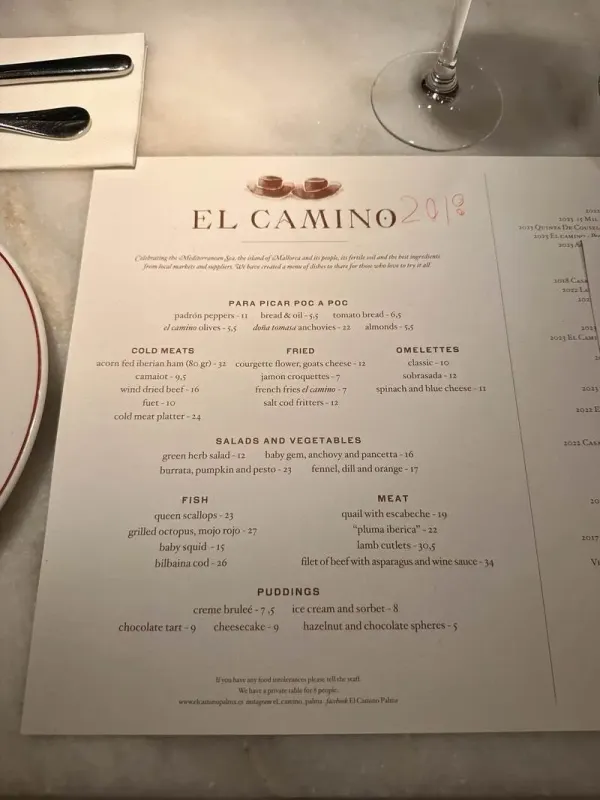
Generic live-camera translators force you to hold your phone hovering over a French chalkboard or Japanese pharmacy box while shaky, tiny text flickers on and off — miserable in dim trattoria lighting or bright Mediterranean sun.
Ask Lucy on iPhone and iPad (iOS 26+) takes a much calmer approach:
- Snap once, lower your hand, read comfortably: Tap the Lock Screen widget, take up to 4 clear still photos in a single turn (front and back of a medicine box, or a multi-page menu plus wine list), and rest the phone in your lap. Built-in Blurry and Too dark flags plus an automatic Light toggle gently warn you before sending if a dim shot needs a second try.
- Native Dynamic Type & VoiceOver: Every reply respects your iOS text size and VoiceOver settings cleanly — zero tiny overlays to pinch and zoom.
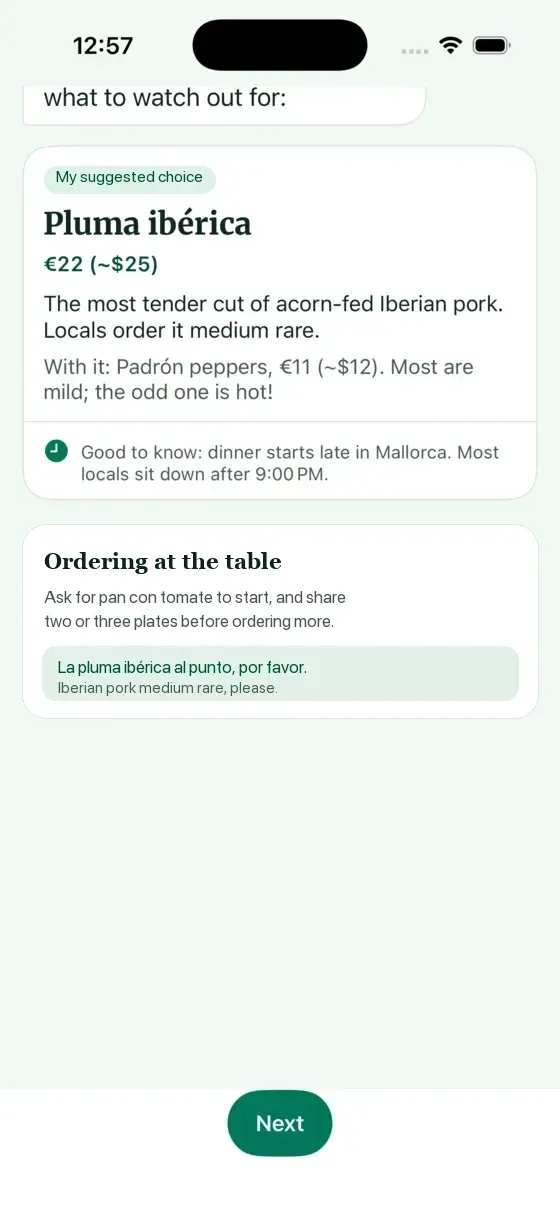
- Full-screen Show-your-server cards: Need to confirm a food allergy, request still tap water, or ask for the train platform? Ask Lucy generates a bold, high-contrast full-screen card in the local language that you simply turn toward your server or ticket agent — no awkward squinting or stumbling over pronunciation.
- Home-first prices & one-tap Details cards: Foreign prices appear in your own currency first (
$24 (€21)) inside tidy Price list cards at live rates (so nobody has to do mental division at checkout). Better yet, snap a hotel Wi-Fi card, tour voucher, or pharmacy card and Ask Lucy extracts a Details card with one-tap Join Wi-Fi (zero typing 16-character passwords!), Call, Copy, and Apple Maps Directions. - Tailored to how you travel: Save allergies with Severity (
mild,moderate, orsevere) behind explicit one-tap Health consent for conservative four-state Safety verdicts (Safe, Caution, Unsafe, or Unknown — never guessing Safe from a dish name alone). Set a Diet (vegetarian/vegan/pescatarian/gluten-free — no Safety verdict card) or add standing instructions inside Notes to Lucy (up to 2,000 characters — for example, “Keep menu summaries short and point out cash-only notices or cover charges”). (Ask Lucy is never a doctor or pharmacist — always confirm medication dosing with a licensed pharmacist and severe allergies directly with kitchen staff.)
2. Apple Wallet — Zero Paper Fumbling at Gates and Turnstiles
Digging through a tote bag for crumpled boarding passes or hunting through email attachments while a queue builds behind you is pure travel stress. Tap Add to Apple Wallet on every airline check-in pass, European high-speed rail ticket, museum timed entry, and digital transit card (like Japan’s Suica, PASMO, or ICOCA). Everything sits one double-click away — offline, bright, and scannable in half a second.
3. Offline Maps + Step-Free Routing (Protect Your Knees and Energy)
Whether you avoid steep staircases for joint comfort or simply don’t fancy hauling a rolling carry-on up forty un-escalatored Paris Metro steps, Google Maps hides a brilliant setting: tap Transit options → Wheelchair accessible to prioritize elevator-equipped stations and level bus connections automatically!
Before flying, download offline map areas for every city or cruise port in Apple Maps or Google Maps — your live blue GPS dot still tracks you accurately even in Airplane Mode, making it effortless to stroll side streets and walk straight back to your hotel or tender dock.
4. WhatsApp & Simple eSIM Data (Staying Connected Without Bill Shock)
Most European boutique hotels, private airport drivers, cooking-class hosts, and independent shore guides communicate effortlessly via WhatsApp — and it gives you crystal-clear voice and video calls home over Wi-Fi or affordable prepaid travel eSIM data (see our Cruise eSIM Guide) without paying $10–$12/day carrier roaming fees.
5. Honest Backups for Zero Signal and Spoken Conversations
Keep two clear boundaries in mind so you are never caught off guard:
- Offline dead zones: Ask Lucy needs mobile data or Wi-Fi to generate replies (if signal dips inside a stone cellar or train tunnel, its Offline outbox queues your snapped photo and sends automatically once bars return). Download free offline language packs in Google Translate (or Apple Translate where supported — remembering Apple omits Greek, Croatian, Maltese, Czech, Hungarian, European Portuguese, and Tagalog) so you always have an instant offline backup.
- Live two-way spoken chats: Ask Lucy is photo and text chat rather than live spoken voice interpreting. For live back-and-forth spoken conversations with a taxi driver or hotel desk, use Apple Translate or Google Translate Conversation mode — or, in Japan, our sister app Let’s Tango, built specifically for natural live spoken Japanese.
Ready to build a calmer travel phone? Explore our Best Camera Translation App for iPhone, Best Apps for a Mediterranean Cruise, Accessible Cruising Guide, Translating Foreign Receipts & Bills, and French Pharmacy Guide for Travelers.
Common questions
Why are still-photo translators easier to read than live AR camera apps?
Live augmented-reality camera translators hover tiny, flickering text directly over a foreign menu — which forces you to hold your wrist perfectly steady in dim candlelight while squinting at words that jump around whenever your hand shifts. Snap-and-read tools like Ask Lucy let you take one steady photo (with automatic Blurry and Too dark flags plus an auto Light button), put your phone comfortably in your lap, and read crisp large text sized to your iPhone or iPad Dynamic Type setting.
How do I make travel apps automatically use larger, clearer text on iPhone or iPad?
Open iPhone or iPad Settings → Display & Brightness → Text Size (or Settings → Accessibility → Display & Text Size → Larger Text for extra-large sizes and Bold Text). Well-built native apps — including Ask Lucy, Apple Maps, Apple Wallet, and Apple Health — scale smoothly to your chosen text size without cutting off buttons or scrambling layouts.
Can I use Ask Lucy on an iPad as well as an iPhone?
Yes. Ask Lucy is built natively for both iPhone and iPad (iOS 26+), and linking your Account with Sign in with Apple lets you access your saved Profile, home currency, allergies, and chats smoothly across your iPhone on shore excursions and your larger-screen iPad back at the hotel or cruise cabin. Note that Ask Lucy is iPhone and iPad only — there is no Android version.
What is the easiest way to store my medications and allergies on my iPhone for emergencies?
Set up Medical ID inside the built-in Apple Health app (Settings → Health → Medical ID): list medical conditions, serious allergies, medications with generic active names, and emergency contacts, and toggle 'Show When Locked' ON so first responders can view it even if your phone is locked. Inside Apple Health, you can also log daily Medications with gentle reminders that follow you across time zones.
Which offline translator backup works across every European cruise port?
Download Google Translate's offline language packs before flying — especially for Eastern Mediterranean or Central European trips. While Apple Translate is wonderfully tidy and built into iPhone, as of 2026 Apple Translate still does NOT support Greek, Croatian, Maltese, Czech, Hungarian, European Portuguese, or Tagalog/Filipino, whereas Google Translate covers them offline for text and camera translation (and offers live spoken Conversation mode whenever you have data or Wi-Fi on iOS).