

Allergies & Diets
Food Allergy Translation Cards: How to Write Them & When Apps Win
Last updated
A laminated allergy card opens the right conversation before you sit down — yet static paper breaks down the moment a handwritten daily special or regional broth shows up. Here is how to structure a bulletproof card, plus four ready-to-show multi-language templates.

On this page (10 sections)
- In short
- How it works
- Why Static Allergy Cards Help — and the Four Places They Break Down
- The Five-Part Formula for a Bulletproof Allergy Card
- Printed Cards vs. Digital Screenshots vs. Ask Lucy On the Spot
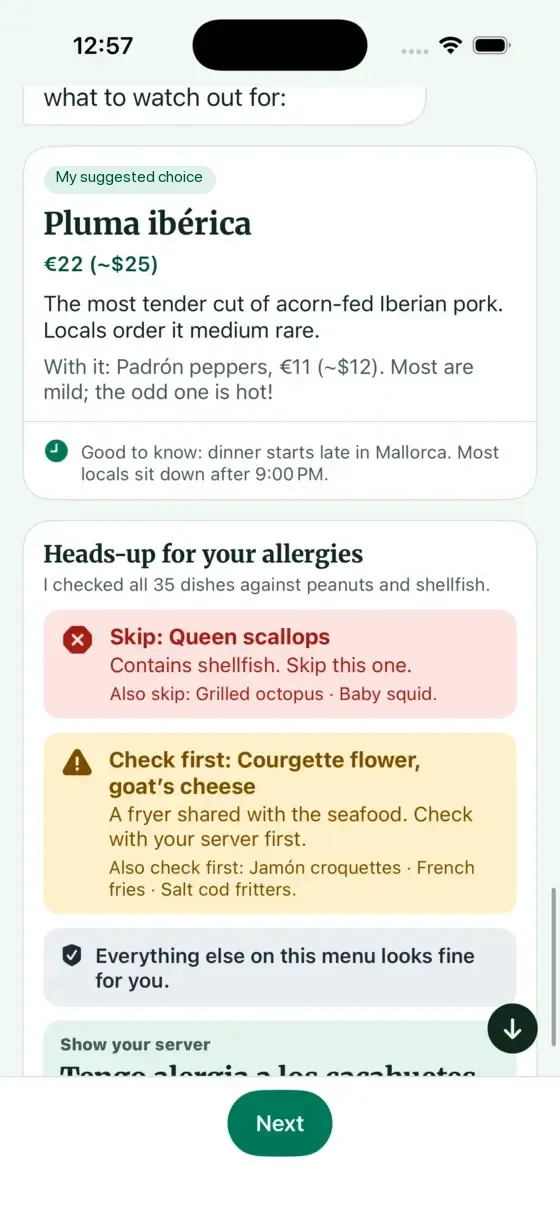
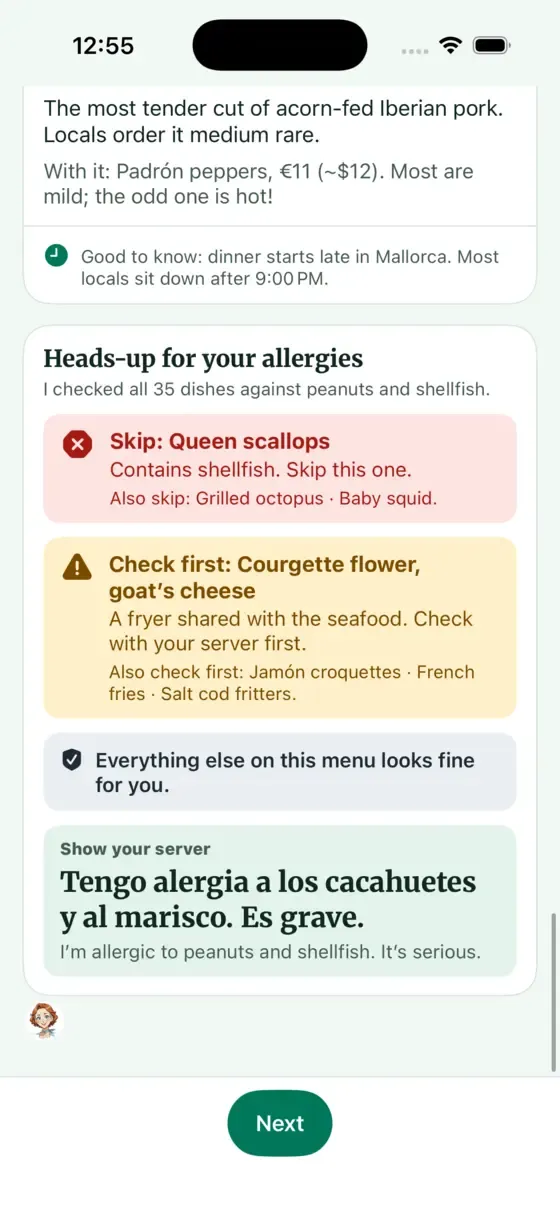
- How Ask Lucy’s Safety Verdicts Pair With Your Backup Card
- Cards to show
- Watch out for
- Common questions
- Use Lucy on the spot
How to use food allergy translation cards safely
Carry a concise, local-language allergy card that names your exact allergens, medical severity, regional hidden sauces, and cross-contact risks, and show it BEFORE ordering. Pair that static backup with a camera-based checker like Ask Lucy to read actual menus, chalkboard specials, and back-of-pack ingredient labels on the spot — because a card tells staff what you avoid, not what is hidden inside today's dish.
- Best time to show a card
- Before ordering — ideally when greeting the host or server
- Must-have 5 elements
- Medical severity, exact local allergen names, hidden derivatives, cross-contact line, polite close
- Biggest static-card gap
- Cannot read handwritten daily menus, packaged labels, or regional hidden broths
- Strongest travel setup
- Laminated backup card + Ask Lucy menu/label scans + downloaded offline language pack
How it actually works on the spot
-
Hand over or display your card before you look hungry
Showing your card the moment you sit down gives the server and chef room to check sauces and prep lines honestly — or politely tell you if the kitchen cannot prevent cross-contact — before plates are already hitting the pass.
-
Check the actual menu and packaged labels separately
A static allergy card only broadcasts your restrictions; it never decodes what is inside the 18 dishes on the chalkboard or the snack wrapper in your hand. Snap up to 4 photos of menus or ingredient panels with Ask Lucy to flag hidden regional risks dish by dish.
-
Confirm cross-contact and give staff permission to say no
In hospitality cultures where staff hate disappointing guests, explicitly thanking them for telling you if a kitchen cannot accommodate safely prevents polite guessing — and keeps you out of an ambulance.
Why Static Allergy Cards Help — and the Four Places They Break Down
If you travel with celiac disease or a severe food allergy, a clean, laminated translation card in your wallet earns its keep before you even touch a fork. It needs no battery, survives basement wine cellars with zero mobile signal, and can be handed straight to a waiter to carry back to the kitchen pass.
Yet anyone who has tried relying only on printed cards across Europe or Asia hits the same four friction points fast:
- Regional hidden stocks and sauces. A generic English-to-local card that simply says “no fish” or “no wheat” often misses the culinary building blocks chefs stop noticing as separate ingredients — bonito dashi and wheat-fermented shoyu soy sauce (covered in our Japan Food Allergy & Celiac Guide), fermented fish sauce (nuoc mam) in Vietnamese dishes, salted shrimp (saeujeot) in Korean kimchi, anchovy in Italian sauces, or bread blended into Spanish salmorejo.
- Handwritten daily specials and unprinted menus. Your paper card tells the server what you cannot eat, but it cannot translate the fourteen scrawled chalkboard dishes on the wall — leaving you pointing blindly while everyone waits.
- Packaged snacks and grocery runs. Standing in a convenience store trying to figure out whether a bakery pastry contains walnut oil, sesame, or milk powder requires reading the actual ingredient panel, not waving a restaurant card.
- Follow-up questions at the table. The moment a server comes back with a specific question (“This risotto uses Grana Padano — is aged cheese okay?”), a static card goes silent.
The Five-Part Formula for a Bulletproof Allergy Card
Whether you print cards before departure or keep templates saved on your phone, skip vague one-liners like “No nuts please.” Staff hear dietary preferences all day; a card that protects you separates medical risk from preference in five crisp moves:
- 1. State medical severity up front. Spell out the real consequence clearly (“Eating this will send me to the hospital” or “I have celiac disease”), never “I prefer to avoid…”
- 2. Name exact allergens in natural local culinary words. In Romance languages, separate peanuts (arachides / arachidi / cacahuetes) from tree nuts (fruits à coque / frutta a guscio / frutos secos) and list key examples. In Japan, pair kanji with katakana (
落花生・ピーナッツ) and specify individual nuts. - 3. Call out the region’s sneaky derivatives. Name broths, soy sauce, butter, cream, cooking oils, and sauces explicitly so a line cook thinks past the garnish.
- 4. Spell out cross-contact. Mention shared frying oil, grills, pasta/noodle boiling pots, cutting boards, and utensils — especially crucial for celiac disease, peanut, tree nut, buckwheat, and crustacean allergies.
- 5. End with a polite, collaborative exit. Thanking staff and explicitly inviting them to tell you if the kitchen cannot prepare a safe meal gets you honest protection instead of nervous improvisation.
Printed Cards vs. Digital Screenshots vs. Ask Lucy On the Spot
Different moments on a trip favor different tools — and travelers with severe allergies rarely have to pick just one:
| Feature | Static printed / laminated card | Saved phone PDF / screenshot | Ask Lucy (Show-your-server + Safety verdicts) |
|---|---|---|---|
| Works with zero signal or battery | Yes — unbeatable basement backup | Battery needed; works offline | Needs Wi-Fi/data (Offline outbox queues photos for later) |
| Hand directly to the kitchen | Yes — server can carry it to the chef | Awkward to hand over an unlocked phone | Full-screen large-type card built to show across the table |
| Reads real menus & chalkboards | No | No | Yes — snap up to 4 photos in one turn |
| Checks packaged ingredient panels | No | No | Yes — reads full local-script ingredient lists |
| Dish-level risk clarity | General rules only | General rules only | Explicit 4-state verdicts: Safe, Caution, Unsafe, Unknown |
| Multi-country & diet updates | Must reprint for every country/change | Must edit & re-export files | Save allergies/diet/pregnancy once; works across major scripts |
How Ask Lucy’s Safety Verdicts Pair With Your Backup Card
Before you board, set your exact allergies (with mild, moderate, or severe severity) and Pregnancy once in your Ask Lucy Profile on iPhone or iPad (iOS 26+) — both sit behind explicit Health consent, whereas Diet (vegetarian, vegan, pescatarian, or gluten-free) does not require Health consent. Lucy never passively guesses health details from casual chat, and never saves health data into general memory.
When a menu lands on the table, snap up to 4 photos (printed menu, daily chalkboard, or packaged back panel). Ask Lucy evaluates each item against your saved allergies using four explicit Safety verdicts — Safe, Caution, Unsafe, and Unknown — while your Diet and Pregnancy settings automatically shape Lucy’s written explanations. Crucially, an unchecked item or a bare dish name without a full ingredient list is never stamped Safe; Lucy flags hidden regional risks and generates a clean, full-screen Show-your-server card in the local language tailored to the exact dish you are asking about.
Pair that with two honest backups: keep a laminated printed card in your pocket for signal-free stone cellars, download an offline pack in Apple Translate or Google Translate before takeoff, and when you need a live back-and-forth spoken conversation with a chef, use Apple or Google Translate Conversation mode (or sister app Let’s Tango for live two-way spoken Japanese). No app or card replaces direct kitchen confirmation — or your EpiPen — yet combining a crisp backup card with dish-level menu checks turns dining abroad from anxious guesswork into something you can actually enjoy.
Cards to say or show
Tap any sample card to display it full screen. Use these four multi-language templates as starting points — and for dish-specific cards naming your exact saved allergens, generate a tailored Show-your-server card in Ask Lucy.
Watch out for
- Never rely on literal machine-translated allergen lists: 'nuts' translated poorly can capture peanuts while omitting almonds or pine nuts, and 'shellfish' can miss bivalves like clams and scallops in East Asian languages.
- Do not assume 'no meat' or 'vegetable broth' is fish- or dairy-free: Japanese dashi uses bonito fish flakes, Vietnamese sauces rely on fermented fish sauce (nuoc mam), Korean kimchi often includes salted shrimp (saeujeot), and European purées finish with butter or cream.
- A dish name alone is NEVER proof a meal is safe: even an honest allergen tool should mark an unverified restaurant dish 'Unknown' or 'Caution' until you confirm exact ingredients and prep directly with the kitchen.
- Beware tiny fonts on phone screenshots: dim dining rooms and busy servers mean a tiny PDF screenshot gets skimmed instead of read — use large, high-contrast full-screen text or a clean laminated card.
- Pack for dead zones before you fly: restaurant basements and stone-walled trattorias kill mobile signal, so always carry a printed backup card alongside downloaded Apple or Google Translate offline packs.
Common questions
Are printed food allergy translation cards still worth carrying in 2026?
Yes — especially for severe or anaphylactic allergies. A laminated card needs zero battery or Wi-Fi, lets a server carry your exact restrictions back to the chef, and sets clear boundaries the moment you sit down. The smartest travel strategy is pairing a printed backup card with Ask Lucy to decode actual menus, chalkboard specials, and back-of-pack labels.
What five things should every food allergy translation card include?
Every effective card states: (1) medical severity (hospital/emergency risk, not a casual dislike), (2) exact allergen names in natural culinary terms, (3) top hidden local derivatives (such as dashi, soy sauce, fish sauce, or butter), (4) cross-contact rules (shared fryers, grills, boiling water, utensils), and (5) a polite close asking which dishes are safe — or thanking them for telling you honestly if none are.
Why shouldn't an app mark a restaurant dish 'Safe' just from its name?
Because restaurant menus rarely list every broth, glaze, oil, or garnish. A seemingly plain grilled chicken or vegetable soup might be marinated in wheat-brewed soy sauce or cooked in bonito stock. Ask Lucy uses four-state Safety verdicts (Safe, Caution, Unsafe, Unknown) and treats a dish name without a full ingredient list as never enough on its own to call it Safe — prompting direct confirmation with the kitchen.
Does Ask Lucy work offline for allergy cards if a restaurant has no signal?
Ask Lucy requires Wi-Fi or mobile data on iPhone and iPad to analyze menus and generate new answers — photos snapped offline queue in her Offline outbox and send automatically once connectivity returns. For zero-signal basements or remote villages, always carry a laminated printed allergy card and download Apple Translate or Google Translate offline language packs ahead of your trip.